

Google Ads automated promotions let Google read offers off your landing pages and attach them to your Search and Performance Max ads as promotion assets. Google's email to advertisers, as reported by Search Engine Roundtable on October 5, 2026, says enrollment starts October 12 and is opt-out. To turn it off, open account-level automated assets in Google Ads, go to Advanced settings, and set Automated promotions to Off. Check your Assets report first, so you know what Google has already attached.
What are Google Ads automated promotions?
They are a type of account-level automated asset. Google's help page says automated promotions show valid, high-quality deals from your website inside your ads, to drive online and offline conversions. Google finds offers on your landing pages, such as "buy one get one free," and attaches them to eligible Search and Performance Max campaigns (Google Ads Help: About Automated promotions).
Google's own example is a landing page offering 20% off black sweaters. Google would pull that offer in and show it in search results.
Google also lists automated promotions next to other automated assets such as dynamic sitelinks, dynamic callouts, and seller ratings (Google Ads Help: About account level automated assets). That page says Google Ads creates these assets and shows them below ads when it predicts they will improve results.
What changed on October 12, 2026?
The feature was documented before the email. Search Engine Roundtable reported Google's help page on September 7, 2026. The email is the rollout notice.
According to Search Engine Roundtable's October 5 report of Google's email to advertisers:
- Starting October 12, 2026, Google will automatically identify and extract promotions, such as coupons and deals, from advertiser websites and apply them to campaigns.
- It applies to Search and Performance Max campaigns with linked location assets and no promotion assets.
- It is opt-out. The email's path is account-level automated assets, then Automated Promotions, then Off.
Everything in that list comes from the email as reported. I could not read the email itself, and Google's help pages do not state the October 12 date. Search Engine Roundtable also notes that Google emailed "some advertisers," so your account may not have received it.
One more caution. I could not confirm from Google's pages whether the feature is live in your account today, or which countries and languages it covers. Check the settings screen before you assume either way.
Which campaigns are eligible?
Google's help page sets two conditions:
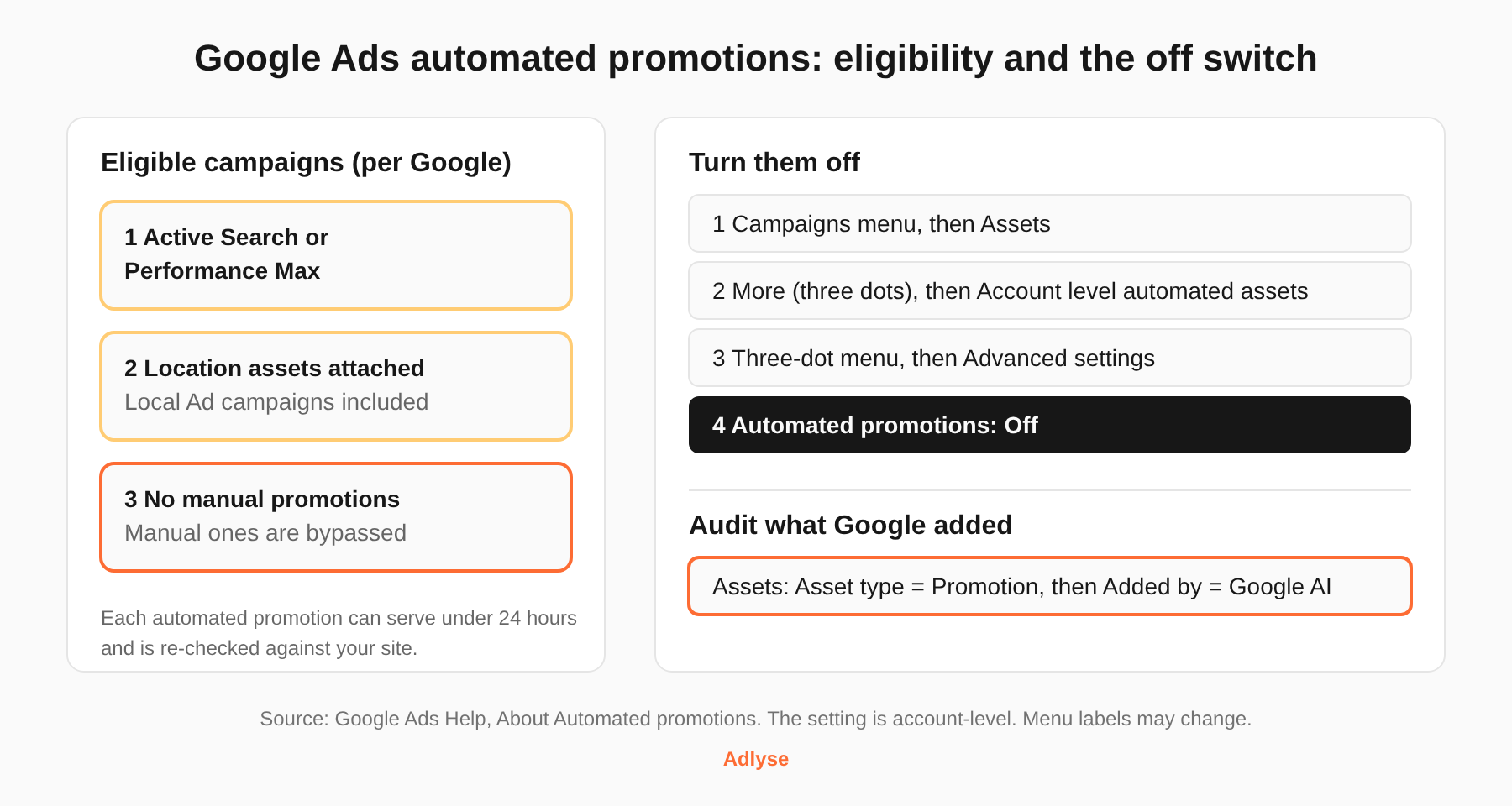
- The campaign is an active Search or Performance Max campaign with Location assets attached. Google says Local Ad campaigns are included.
- The campaign has no manual promotions running. Campaigns with manual promotions are bypassed.
Campaigns also have to follow Google Ads advertising policies.
The email, as reported, words the second condition as "no promotion assets." The help page says "manual promotions." These read as the same thing, but Google has not said so. If you want certainty, look at a campaign with a manual promotion and confirm it gets no automated ones.
This works in your favor. A campaign that already carries a manual promotion asset is the control group. You decide what it says, and Google does not add to it.
What will Google add to your ads?
Based on Google's page, you should expect these things.
- Offers from your landing pages. Google extracts promotional details from your site. It advises keeping those details current.
- Short serving windows. Each automated promotion can serve for less than 24 hours. Google may re-enable it afterward if its systems can keep verifying that the offer is still visibly available on your site. Google says this is expected to change once it can extract promotion start and end dates.
- Wider placements. Promotions may serve on Google Search or across Google's wider ad inventory.
- Your manual assets stay in play. Google's account-level page says automated assets work alongside manual ones, and it recommends using every manual asset that fits your business.
On cost, Google's account-level automated assets page says the assets themselves are free, but normal click charges apply. It also says charges are capped at two clicks per impression on an ad and its assets. That page covers automated assets as a group. The automated promotions page does not discuss billing.
How do you see what Google already added?
Google's page gives a filter path:
- Open Assets in the Campaigns menu.
- In the filter bar, choose Asset type, then Promotion.
- Read the Added by column. Automated promotions are labeled Google AI.
- Hover over Google AI for sourcing details, or over a promotion name for asset details such as the headline.
Do this first, even if you plan to turn the feature off. It tells you whether Google has already attached anything to your campaigns, and you will want that record before you change the setting.
How do you turn off Google Ads automated promotions?
Google's steps for opting out are the same path used to opt in, with the setting flipped (Google Ads Help):
- Open Assets in the Campaigns menu.
- Click the three-dot More icon in the filter bar and select Account level automated assets.
- Open the three-dot menu on that page and select Advanced settings.
- Set Automated promotions to Off. Give a reason if prompted.
Google's general page on account-level automated assets describes the same area: open the Associations tab, use the three-dot menu, choose Account level automated assets, then open Advanced settings and select the asset to turn off. Menu labels move around in Google Ads, so follow whichever path you see.
The control is account-level. The pages I read describe no campaign-level switch. If you run many client accounts, this is a per-account setting, so it belongs on your onboarding checklist and your next account review.
Should you turn them off?
Google's page does not say. Here is a way to decide, and it is a judgment call, not a Google recommendation.
Leave it on if your site shows accurate, current offers, your pricing rules are simple, and you can review the Assets report weekly. Google's pitch is less manual work, and for a promotion-heavy retailer in Q4 that may be real.
Turn it off if any of these are true:
- Your offers have exclusions, minimum spends, or margin limits that a landing page does not make clear.
- Your legal or brand team approves every claim before it runs.
- You run location assets for a multi-location brand where offers differ by store.
- You need start and end dates to line up with a launch. Google's own page says to upload promotions manually when you need that control.
There is a middle route. Upload a manual promotion on the campaigns where offer accuracy matters. Google's page says those campaigns are bypassed. That keeps the feature on elsewhere and gives you control where it counts.
Whatever you choose, write it down. A default-on change that nobody logged is the kind of change you get asked about three months later. Adlyse's guide to setting guardrails on AI ad spend covers why defaults need an owner.
How does this fit with the rest of your Google Ads setup?
Automated promotions are one of several places where Google now acts on your account unless you say no. Google's AI Max auto-migration is another. If you run Performance Max, Adlyse's Performance Max guide shows how to set up your reviews. For the wider picture, start with the Google Ads and AI agents guide.
Timing matters too. If you are planning holiday offers, the Q4 and BFCM pacing plan is the place to decide who owns the offer feed before sales start.
What should you do next?
If you run several Google Ads accounts, a default-on setting is a review task times the number of accounts. Adlyse executes approved changes across Google, Meta, Microsoft, and OpenAI/ChatGPT Ads, ships every change with a hypothesis, and grades the result as improved, hurt, or neutral, so a setting change like this one gets logged and checked rather than forgotten.