
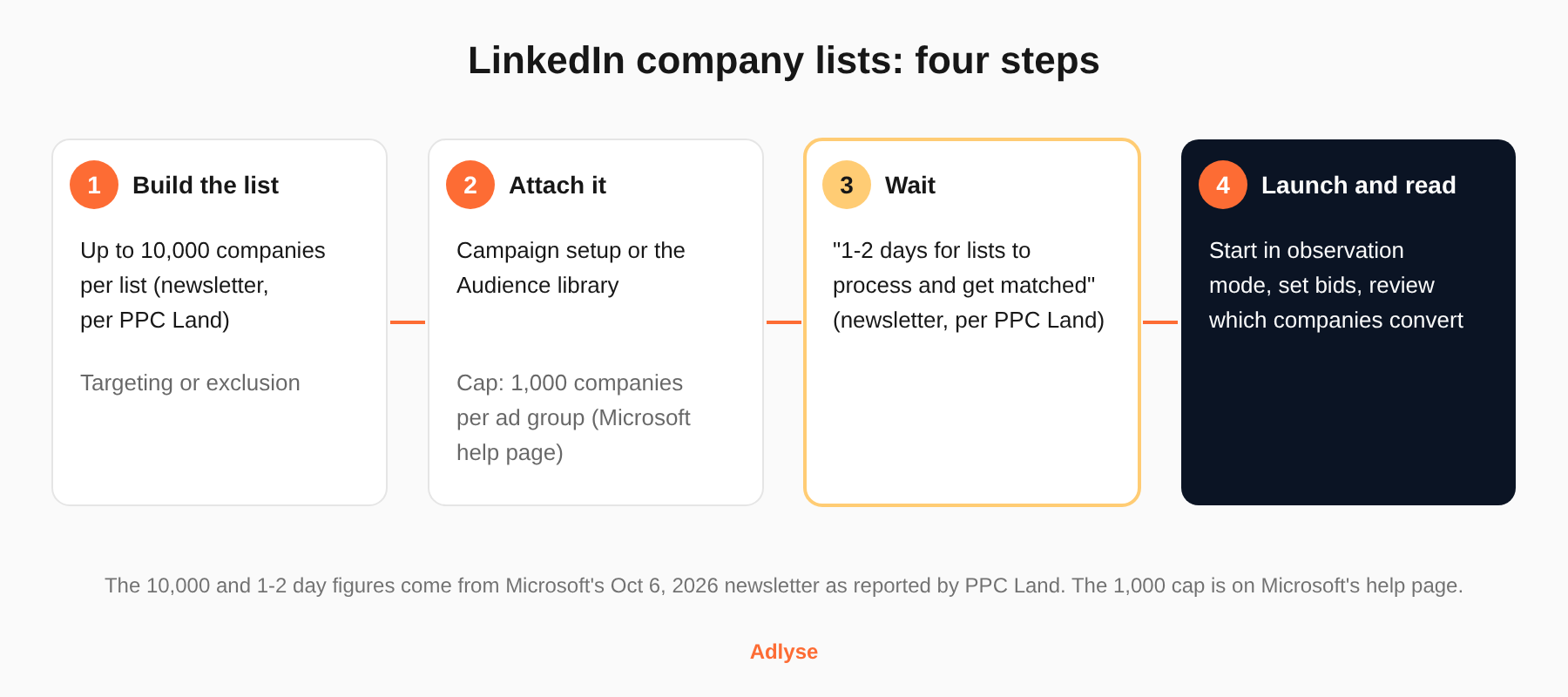
To target LinkedIn company lists in Microsoft Advertising, build a list of the companies you want, attach it to a campaign or ad group, and give it 1-2 days to process before you judge results. Microsoft's October 6, 2026 newsletter, as reported by PPC Land, says a list can hold up to 10,000 companies. One limit still applies per ad group: Microsoft's LinkedIn profile targeting help page says you cannot target more than 1,000 companies in a single ad group or campaign.
What should you know before you start?
- What it is: a way to bid on, or exclude, people who work at named companies, using LinkedIn profile data. Microsoft's help page lists three LinkedIn-based targets: company, industry, and job function.
- What is new: bulk company lists. A Microsoft Q&A answer from a support specialist on June 10, 2026 said importing company lists from external files was not supported. The October newsletter, per PPC Land, describes lists of up to 10,000 companies.
- What is unclear: the version of Microsoft's help page I read says importing is not supported, and the newsletter as reported gives no file format or click-by-click upload steps. Treat the exact upload path as something to confirm in your own account.
- Timing: the newsletter says, "It can take 1-2 days for lists to process and get matched." Plan launches around that.
What changed in Microsoft's October 6, 2026 newsletter?
PPC Land, which reported the newsletter on October 6, 2026, says Microsoft now lets advertisers add up to 10,000 companies to a targeting or exclusion list. Lists can be created during campaign setup or in the Audience library, and one list can serve existing and future campaigns.
This post is not breaking news. The newsletter is several weeks old. It is a how-to for a feature whose public documentation has not caught up.
I could not open the newsletter itself. Everything attributed to it here comes from PPC Land's report. Microsoft's help pages, which I could read, are cited separately.
How many companies can you target?
Two numbers circulate, and they measure different things.
- 10,000 per list. PPC Land reports this from the newsletter. PPC News Feed, reporting on changes to Microsoft's Audience planner help page on September 26, 2026, also says each list can hold up to 10,000 companies.
- 1,000 per ad group. Microsoft's LinkedIn profile targeting help page says, "You cannot target more than 1,000 companies in a single ad group or campaign." PPC News Feed reports the same ad group ceiling from the Audience planner page.
So the numbers do not conflict if you read them as a list limit and a targeting limit. A 10,000-company list is a library. What an ad group can use at once is capped at 1,000, according to Microsoft's help page.
One caveat. I could not open the Audience planner help page, so the 10,000 figure rests on two secondary reports of Microsoft's material. The 1,000 figure is the only one I read on a Microsoft page. If you plan around a 10,000-company ad group, test it in your account first.
How do you set up company targeting?
Microsoft's help page documents company targeting in the interface. These steps come from that page.
When you create an ad group:
- Select Create ad group.
- In Ad group target & bids, select Company, Industry, or Job function.
- If the target is set at campaign level, turn off Use my campaign settings and select Edit target.
- Search or browse, then select Target on each company.
- Select Done, then set a bid adjustment for each target.
In an existing campaign or ad group: open Settings, find Campaign targets or Ad group targets, and select Edit target categories. The steps then match the list above.
To change or remove targets: go to Campaigns, select the campaign, open Demographics, choose Company, and use Edit to enable, exclude, delete, or change the bid adjustment.
For bulk lists, PPC Land says to use either campaign setup or the Audience library. It gives no further steps. Where the bulk upload lives in your account is the part to verify, and I have not seen Microsoft document it.
Which campaign types can use company targeting?
Microsoft's help page says LinkedIn profile targeting is available for Search, Dynamic Search ad, Microsoft Shopping, Audience, and Performance Max campaigns. For Performance Max, it adds that not everyone could use it yet when the page was written.
PPC Land says the newsletter previewed three workflows:
- Performance Max: company targeting as an audience signal in new campaigns, which the newsletter says matters most early in an asset group's life.
- Audience ads: professional demographics alongside content targeting and term exclusions.
- Search: observation mode, to see which professional segments respond, then refine ad copy with Copilot in Microsoft Advertising Platform.
Will a company list narrow your audience?
It depends on the campaign setup, and the two sources describe different behavior.
Microsoft's help page says LinkedIn profile targeting "will not narrow your ads' audience" and compares it to "bid only", as opposed to "target and bid". Targeting a company does not exclude everyone else.
PPC Land's account of the newsletter describes narrowing. Paired with other LinkedIn targeting such as industry or job function, a company list acts as an "or" and widens eligibility. Paired with devices, locations, or content targeting, it acts as an "and" and narrows eligibility.
The help page does not say whether this holds for the newer bulk lists, so run a small test. Attach a list to one ad group, check impressions against a comparable ad group without it, and see whether reach shrinks or only bids change. The result tells you whether the list is a bid lever or a filter in that campaign type.
How do you use a company list as an exclusion?
Both sources mention exclusions. PPC Land says lists can be used as exclusion lists as well as targeting lists. Microsoft's help page shows an Exclude option in the target edit menu but does not explain it further.
Good candidates for an exclusion list are current customers, competitors, and companies in an open sales cycle you are handling another way. Keep the list small and named, and record why each group is on it.
How do you size the audience before launch?
Microsoft's Audience planner is where to check. PPC News Feed reports that its targeting pane now has a "Company List" dimension described as companies from bulk-uploaded lists, and that the beta notice has been removed. The planner gives estimates, not guarantees. A new segment may show nothing until 24 to 48 hours of data has processed, per The Keyword's summary.
A short list gives a small audience. Treat it as a precise tool, not a volume engine.
What should you check before you launch?
- Confirm the upload path in your account. Microsoft's public pages disagree on whether bulk import exists.
- Count companies per ad group. Stay under 1,000 unless you have confirmed otherwise.
- Set bid adjustments. The help page says each target needs one.
- Start in observation mode on Search. Learn which accounts respond before you narrow anything.
- Wait out the processing window. Do not read day-one numbers.
- Write the hypothesis down. For example: "Adding the 400-company target list at a higher bid lifts qualified leads without raising cost per lead."
The last item matters most with account-based lists, where a short target list means few conversions to judge. Adlyse covers that problem in B2B Paid Media with AI Agents, and the broader audience question in Audience Strategy When the Algorithm Already Knows.
Where does this fit in a Microsoft Ads setup?
Company lists are one input among several. For the wider picture, see Microsoft Ads + AI Agents: The Complete Guide. If you let automation change list membership or bids, set limits first, as covered in AI Autonomy in Ad Spend: The Guardrails That Actually Matter.
What should you do next?
Build one list of your 100 best-fit accounts, attach it to a single Search ad group in observation mode, and write down what you expect it to change. If you also want an agent working the Microsoft account, Adlyse executes approved changes across Google, Meta, Microsoft, TikTok and OpenAI/ChatGPT Ads, ships each change with a hypothesis, and grades it improved, hurt, or neutral.