

A Performance Max asset experiment splits traffic inside one asset group between your current assets and a changed set. You change one thing, pick one metric, run it for at least four to six weeks, and apply the change only if the treatment wins. Google's help page says assets are locked once the test starts. That lock decides when you should and should not run one.
If peak season is days away, the honest answer for your main asset group may be: wait.
What is a Performance Max asset experiment?
It is an A/B test of creative inside Performance Max. Google's help page, About Performance Max optimization experiments: A/B testing assets (Beta), describes it as a comparison of two sets of assets in one asset group. Your existing assets are the control (A). The new set is the treatment (B). Assets you leave out of both arms are "common" and keep serving to all traffic.
Google has a second, older page for asset testing: About Performance Max optimization experiments: Asset testing. It covers two test types. One adds text, images and video to a feed-only campaign. The other adds videos to a campaign that has other assets. In the video test, the control arm gets no videos and the treatment arm gets yours.
Both describe a split inside one campaign, which Google says can shorten the learning period.
Is this feature actually new?
No. One trade site says asset experiments went live to all advertisers in October 2026. That post is an agency blog and links no Google announcement. I could not find a Google page that gives an October 2026 launch date.
What Google's own pages show:
- A Google help page dated October 23, 2024 said asset experiments for product-feed-only campaigns were coming to the Experiments page, in beta for retailers in early November.
- A Google Ads announcement published April 17, 2026 said asset experiments are coming to Performance Max and "currently rolling out". It lists an optional second success metric as "soon."
- The A/B testing page above is still labeled Beta.
So treat it as a feature that has been rolling out in stages. Check your own account. Availability can differ by account and campaign type, and I could not confirm it for yours.
How do you write the hypothesis?
Write it before you open the Experiments page. Use this shape:
> If we replace [specific asset] with [specific alternative] in [asset group], [metric] will [rise/fall] by [amount you would act on], because [reason].
A good one: "If we swap the three lifestyle images for product-on-white images in the footwear asset group, conversion value will rise, because the feed already shows lifestyle context."
Rules that keep the test readable:
- Change one variable. Google's Smart Bidding guidance for bidding tests says to change one variable at a time and avoid testing new ads or landing pages at the same time. The logic carries over: if you swap images, headlines and the landing page together, you will not know which one moved the result.
- Name the amount. "Better" is not a hypothesis. Decide in advance what lift would make you apply the change.
What should the split be?
You set the percentages for control and treatment yourself. Google's pages do not give a default.
Google's Campaign Guidance page for experiments suggests a 50/50 split for faster results. It also says each arm needs enough traffic to give a conclusive result. A smaller treatment share exposes less revenue to an untested asset, but takes longer to read. That trade-off is arithmetic, not a Google rule.
Use 50/50 on an asset group with steady volume. Use a smaller treatment share only where a bad asset would cost real money, and plan for a longer run.
Pick the right asset group. Google's page for Campaign Guidance says campaigns with consistent performance give more reliable results. Do not test on an asset group with volatile spend.
Also check the blockers. Google's troubleshooting list for asset A/B tests includes:
- a shared budget
- a portfolio bidding strategy
- Smart Bidding Exploration
- another experiment already running or scheduled for the same dates
- an asset group with more than 15 assets
Fix these first, or you may not be able to create the test.
How long should it run?
Google's A/B testing page says the Experiment Guidance System sets the end date, based on the time needed for statistically significant results. You can change it. Google adds that it is recommended to run the experiment for a minimum of 4 to 6 weeks.
That is longer than the general guidance. Google's Monitor your experiments page recommends running experiments for 2 to 3 weeks to gather data. For asset tests, use Google's longer figure.
Google's Smart Bidding guidance for bidding tests treats the first 14 days as ramp-up to leave out of your read, and says to aim for splits that give at least 30 conversions in the last 30 days. Those are bidding-test numbers. Use them as a sanity check on volume, not as an asset-test minimum.
For the calendar, count weeks from the start date. The help page says the start date defaults to the next day. The older asset testing page says the start date can only be today. Check which one your interface shows.
Which metric should decide the test?
One primary metric, chosen before launch.
Use the conversion goal the campaign already optimizes for. Switching yardsticks after the data comes in is how people find a "winner" that is noise.
Google's April 2026 announcement says you can add an optional second success metric to see how a change affects overall performance. The same page listed that as coming "soon," so check whether it is in your account. If it is, use it as a guardrail, not as a second chance to win.
Do not decide on platform ROAS alone. Platform-reported numbers are Google grading Google. For the wider problem, see why cross-platform ROAS numbers disagree. An asset experiment says which creative did better inside one campaign. It does not say how many of those conversions would have happened anyway. For that, see Adlyse's guide to incrementality testing.
How do you read the results?
Use Google's experiment report, with its rules.
Google's Monitor page explains the report:
- The Results column says whether the control or the treatment performed best.
- If it shows no clear winner, Google says either a winner cannot be determined or there is not enough data yet.
- The scorecard shows an estimated difference with a range. The default confidence level is 80%. You can pick another.
- A blue asterisk marks a statistically significant result.
- Google lists reasons a result may not be significant: too little run time, too little traffic, too small a traffic split, or no real difference between arms.
Three habits make the read-out honest:
- Do not call it early. A lead in week one is not a result.
- Drop the newest days. Google's Smart Bidding guidance says to exclude recent days where less than 90% of conversions have been reported. Conversion lag is real in any campaign.
- Treat "no clear winner" as a finding. Keep the control, or run a bolder variant next.
The 80% default confidence level is lower than many teams expect. If the call is expensive to reverse, raise it.
What happens when the experiment ends?
You have two options on Google's help page. Apply updates the original asset group with the experiment's changes. End stops the test with no changes, and new treatment assets are discarded.
One setting to watch. Google's page says the option to apply the treatment if it wins is on by default in the asset group builder. If a person should approve every creative change, turn it off. Then check the result yourself before anything goes live.
Log the hypothesis, dates, split, metric, result and decision in one place. See what an audit trail for AI-driven ad spend should include.
When should you not run a test during peak season?
Not at the start of it. Four reasons, in order of how well they are sourced.
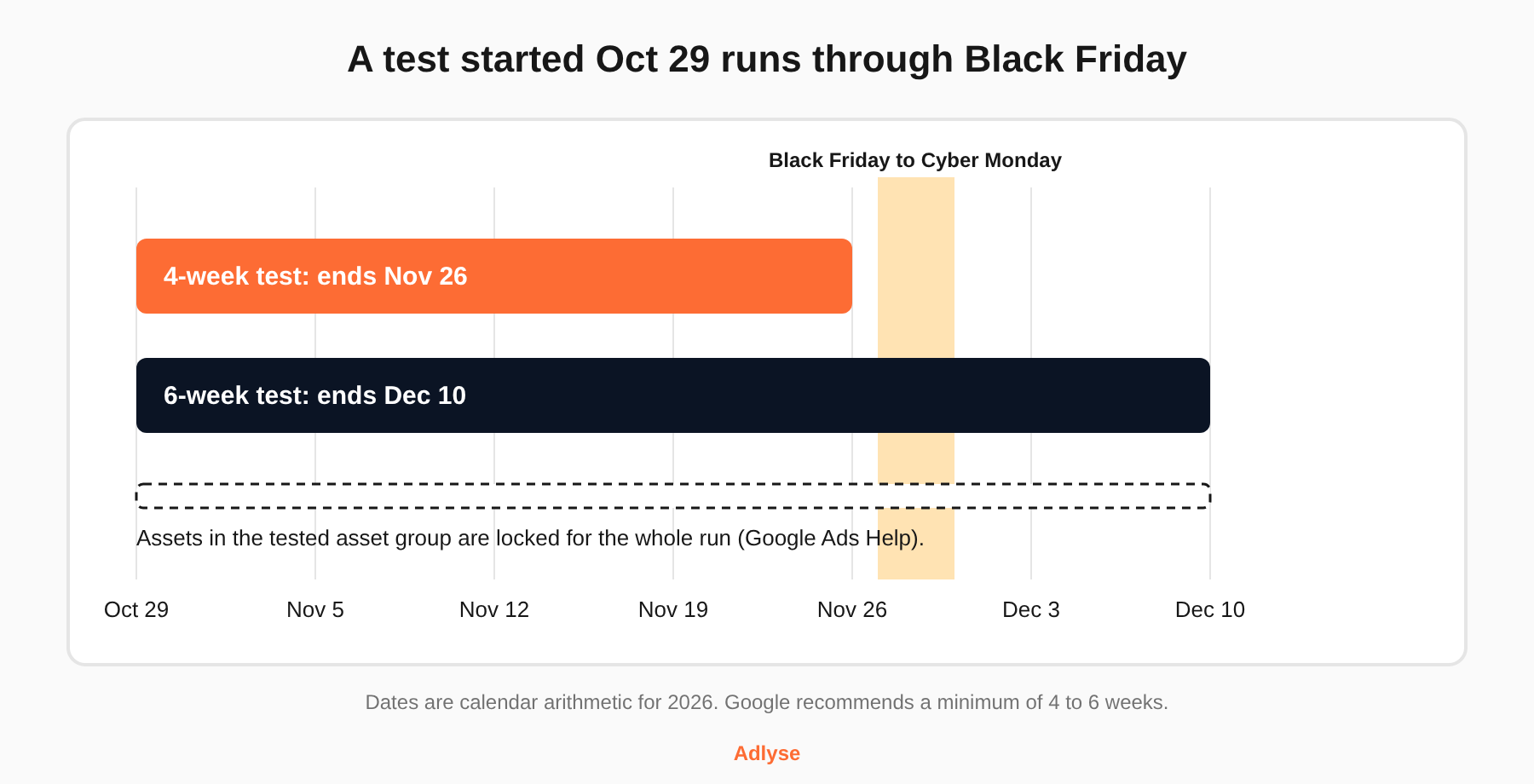
1. The asset group is locked. Google's help page says that once the test starts, you cannot edit, add or remove assets in the tested asset group until it ends. Black Friday week is when you most want to swap in promo creative. A locked group cannot do that.
2. The clock does not fit. Black Friday 2026 falls on November 27 and Cyber Monday on November 30, by the calendar. A test started on October 29 runs to at least November 26 on a four-week schedule, and to December 10 on six. It would cover the whole sales period. A test needs to finish and be applied before your peak creative goes in.
3. One experiment per campaign window. Google lists another experiment running or scheduled for the same dates as a blocker.
4. A peak result may not carry over. This is my judgment, not Google's. Both arms see the same traffic, so the comparison is fair. But the winner in a sale period may be a promo-driven asset that does not win in January. Read a peak-season result as a peak-season result.
What to do instead:
- If you have not started: use your lowest-risk asset group for a test now, and keep the main one free for peak creative. Or schedule the test for January.
- If you started in early October: a four-week run ends before Black Friday. Read it, apply or end it, then freeze.
- If it is still running into the sale: ending it early discards the treatment assets. Decide what you give up before you stop it.
For the budget side of the same weeks, see Adlyse's Q4 and BFCM pacing plan.
What should you do next?
Pick one asset group, one change, and one metric. Write the hypothesis down, set the end date, and decide now what you will do with the result.
Adlyse executes approved changes across Google, Meta, Microsoft, TikTok and OpenAI/ChatGPT Ads. Each change ships with a hypothesis and is graded improved, hurt or neutral. For how that fits with Performance Max, read the Performance Max and AI agents guide.