
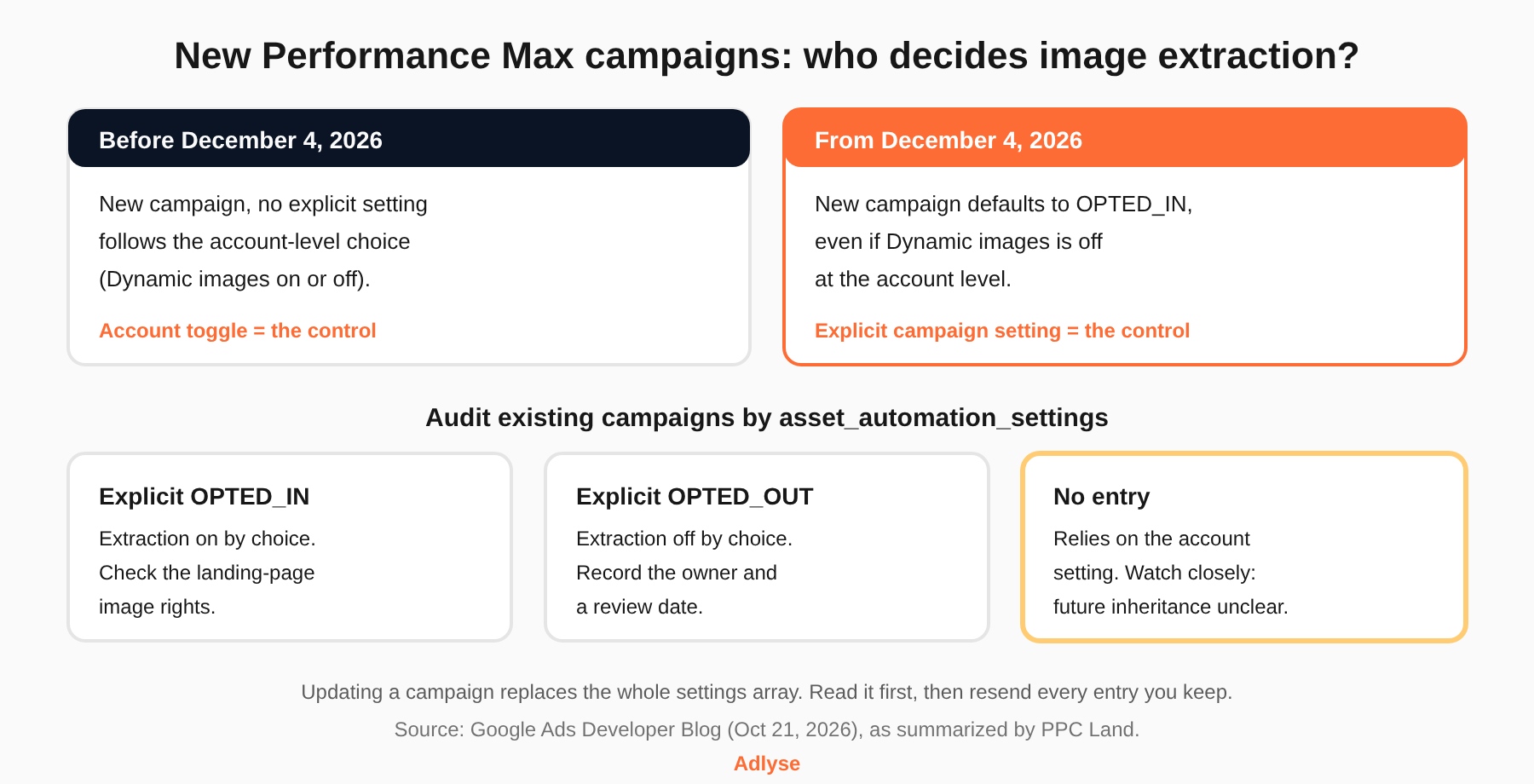
Starting December 4, 2026, Google turns image extraction on by default for newly created Performance Max campaigns, even if Dynamic images is off at the account level. PPC Land reports that this covers the Google Ads API, the Google Ads UI and Google Ads Editor. Existing campaigns keep their current configuration. To stay out, add an explicit opt-out to every campaign-creation payload before that date, and audit the campaigns you already run.
Google announced the change on the Google Ads Developer Blog on October 21, 2026.
What is image extraction in Performance Max?
Image extraction lets Google pull images from your landing page and use them in your ads. PPC Land's summary of the developer post says Google's AI scans landing pages for high-resolution images and can use them across Search, YouTube, Display, Discover, Gmail and Maps.
Google's help page for account-level automated assets describes the same idea under the name dynamic image assets. It says Google Ads can curate relevant visuals from your ad's landing page, and that these images may show instead of manually uploaded image assets.
In the API, the setting is called GENERATE_IMAGE_EXTRACTION. It lives in the asset_automation_settings field on the Campaign resource. Each entry pairs a type with a status of OPTED_IN or OPTED_OUT, per PPC Land's reading of the post.
What exactly changes on December 4, 2026?
The default for new campaigns changes. Per PPC Land:
- New Performance Max campaigns get GENERATE_IMAGE_EXTRACTION set to OPTED_IN by default.
- That holds in the API, the UI and Google Ads Editor.
- It holds even when Dynamic images is disabled at the account level.
Before this, a campaign with no explicit setting followed the account-level choice. That is the practical shift. The account toggle no longer protects a new campaign.
Google's API documentation shows the old rule. In the asset automation settings page, the default for GENERATE_IMAGE_EXTRACTION is "the account-level Dynamic Image Extension control value." The same page says that account-level setting can only be configured in the Google Ads web interface. Re-read that page after December 4, since it may be updated.
Who is affected, and who is not?
Affected:
- Anyone creating a new Performance Max campaign on or after the effective date. That includes agencies that spin up campaigns for new clients or new product lines.
- Teams and tools that create campaigns through the API. PPC Land says integrations need to carry the opt-out into their creation payloads.
- Advertisers whose landing pages carry third-party or licensed imagery. PPC Land says Google asks these advertisers to confirm they hold the rights for commercial and advertising use.
Not affected:
- Existing Performance Max campaigns. Per PPC Land, they retain their current configurations.
- Integrations that want extraction on. PPC Land says Google states no action is needed for them.
One caution. Existing campaigns that have no explicit GENERATE_IMAGE_EXTRACTION entry rely on the account setting. PPC Land flags that it is unclear whether later changes to the account-level setting will keep flowing to those campaigns. Treat them as a risk group until Google says otherwise.
How do you opt out through the API?
Set the type and status explicitly when you create the campaign. PPC Land's summary says to add an entry with GENERATE_IMAGE_EXTRACTION and asset_automation_status of OPTED_OUT to the creation payload, and to do it before December 4, 2026. In REST JSON, the entry looks like this (illustrative; confirm field casing against the current reference):
``jso
"assetAutomationSettings": [
{
"assetAutomationType": "GENERATE_IMAGE_EXTRACTION",
"assetAutomationStatus": "OPTED_OUT"
}
]
`
Updating an existing campaign needs more care. Per the same summary, sending new settings replaces the whole array instead of merging. If you send only the image extraction entry, you can clear the others. So read the current array first, then resend every entry you want to keep, such as TEXT_ASSET_AUTOMATION.
This matters because the array holds more than one automation. Google's API docs list other Performance Max defaults: TEXT_ASSET_AUTOMATION, GENERATE_IMAGE_ENHANCEMENT and GENERATE_ENHANCED_YOUTUBE_VIDEOS are enabled by default for Performance Max, per the same documentation page. A careless write could change those.
The developer docs page does not describe OPTED_OUT, and every code sample on it sets OPTED_IN. The opt-out instruction comes from PPC Land's account of the developer blog post. Check Google's current API reference and test on a paused campaign.
How do you opt out in the Google Ads UI?
Here is what the sources say, and where they stop.
Account level. PPC Land gives this path: Campaigns, then Assets, then the three-dot More menu, then Account-level automated assets, then the three-dot menu, then Advanced settings, where the Dynamic images control sits. Google's own help page lists a close variant: Assets, the Associations tab, the three-dot menu, Account level automated assets, the three-dot menu again, Advanced settings, pick the asset, give a reason, Save.
Campaign level. None of the sources we could read documents a campaign-level opt-out in the UI or in Editor. Relevant Audience makes the same point about the developer post. The account toggle will not stop a new campaign from getting the default, so the UI route may not be enough. Check what your new-campaign flow shows on or after December 4. If it offers no per-campaign control, the API is the documented way to opt out.
How do you audit your Performance Max campaigns?
Do this before December 4 and again after.
- Query the setting. Pull campaign.asset_automation_settings for all Performance Max campaigns. PPC Land says to run a GAQL query for this. A starting point (illustrative; validate in the Query Builder):
```
SELECT campaign.id, campaign.name, campaign.asset_automation_settings
FROM campaign
WHERE campaign.advertising_channel_type = 'PERFORMANCE_MAX'
AND campaign.status != 'REMOVED'
```
- Sort campaigns into three groups. Explicit OPTED_IN, explicit OPTED_OUT, and no GENERATE_IMAGE_EXTRACTION entry. The third group relies on the account setting, per PPC Land.
- Check the account setting. Open Account-level automated assets and note whether Dynamic images is on. It is now the fallback for the third group.
- Check your landing pages for rights. List the images on each landing page you send Performance Max traffic to. Mark anything licensed, user-generated or supplied by a third party. Google's request to confirm rights applies here.
- Look at what Google added. Google's help page says you can filter assets by "Added by" and select Google AI. Review the images and decide to keep or remove.
- Decide on a default for new campaigns. Opt out everywhere, or opt in on a test. Write the decision down with a name and a review date.
- Fix your templates. Update every campaign-creation script, tool and template that builds Performance Max campaigns so the setting is explicit.
Should you opt out or leave it on?
There is no universal answer. Google gives no stated reason for the change, per PPC Land, and no performance figures we could verify.
Opt out when:
- Your landing pages carry images you do not hold advertising rights for.
- Your brand rules restrict which images can appear, or where.
- You cannot review what Google selects.
Test it when:
- Your landing pages carry strong product imagery you own.
- You are short on image assets in the asset group.
For the test, run one new campaign opted in and a comparable one opted out, and state the hypothesis first. Our guide to proving which change drove performance covers the logic. Keep the comparison clean: change one setting at a time.
What does this say about default-on automation?
A platform changed a default, and the account-level switch stopped being the control. That is the pattern to plan for. Settings you set once will not stay yours. Put them in your weekly routine, give each one an owner, and keep a record of who changed what. An audit trail for AI-driven ad spend should separate your changes from the platform's. For the wider picture, see our Performance Max and AI agents guide and the guardrails that matter for AI autonomy over ad spend.
What should you do next?
This is a settings change that no one on your team asked for. Adlyse is built the other way around: it executes approved changes across Google, Meta, Microsoft, TikTok and OpenAI/ChatGPT Ads, ships each one with a hypothesis, and grades the result as improved, hurt or neutral. Start with the audit above, then put an explicit image extraction setting in every Performance Max campaign you create.