

ChatGPT Ads creative enhancements let OpenAI adapt your headlines, descriptions, images and destination URLs to each conversation, and they can run without your review. OpenAI's help article says they will be enabled automatically for new and existing campaigns starting at the end of this month. To opt out, open Ads Manager, select Manage settings, and switch them off at account or campaign level. Do it before the start date if you want to review first.
When do creative enhancements switch on?
The date needs a check, because the sources disagree.
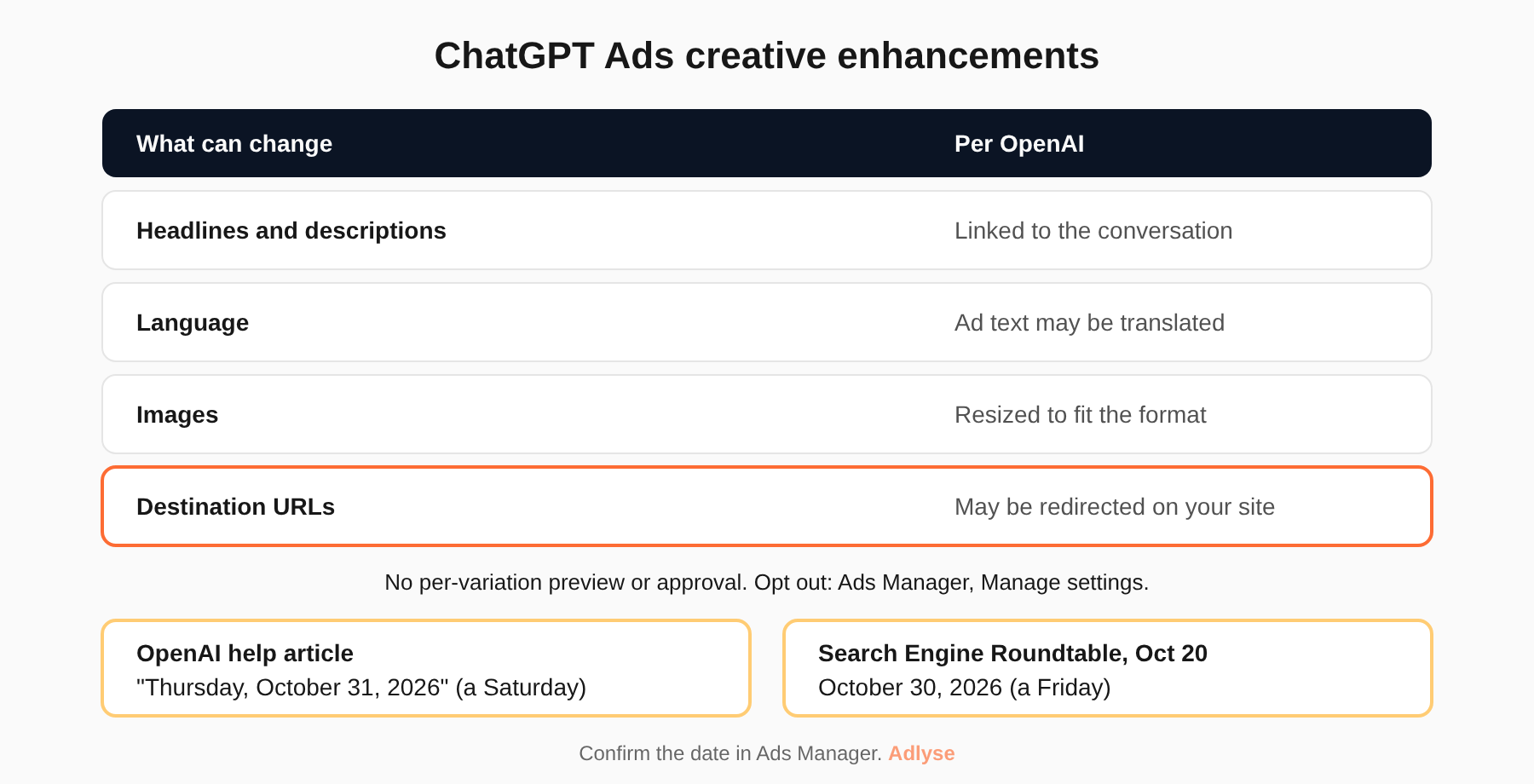
- OpenAI's help article says: "Starting Thursday, October 31, 2026, creative enhancements will be enabled automatically for new and existing campaigns."
- October 31, 2026 is a Saturday, not a Thursday.
- Search Engine Roundtable, reporting on October 20, 2026, says the change applies from October 30, 2026. That is a Friday.
We cannot tell which date is right, and the help article carries no correction. Treat October 30 as the safe deadline and confirm the exact date in Ads Manager under Manage settings. If you want a say before anything changes, set your preference now, not on the last day.
Two more facts about timing. The setting is on by default. And Search Engine Roundtable reports that OpenAI emailed advertisers about it, so check the inbox tied to your ads account.
What are ChatGPT Ads creative enhancements?
OpenAI's help article describes them as a way to adapt your existing ad and landing-page content to a conversation or a user's interests. Variations may be prepared in advance or generated in real time. When enabled, they can run without you reviewing each version.
That last point is the whole story. You supply the source material. OpenAI decides what to show.
What exactly can change in your ads?
The help article lists four things:
| What changes | What OpenAI says |
|---|---|
| Headlines and descriptions | New or updated text that links your offer to the conversation |
| Language | Ad text may be translated |
| Images | Resized to fit the ad format |
| Destination URLs | May be redirected to a more relevant page on your site |
The article does not say which ad formats are covered, so do not assume. It also does not describe limits on how far a headline can move from your original wording.
Destination URLs deserve the most attention. Headline edits change what people read. A URL change changes where the click lands, and that moves your conversion rate, your tracking and your reporting.
How do you opt out of creative enhancements?
Per OpenAI's help article, you can opt out before the start date or change your settings at any time in Ads Manager.
- Open Ads Manager.
- Select Manage settings.
- Choose your setting at account level, campaign level, or both.
Three rules from the same article:
- Existing account-level and campaign-level opt-outs are kept.
- Campaign settings override the account default.
- You can change the setting later. Opting out now does not lock you out.
Search Engine Roundtable reports that the toggle was already on for the author's own account when he checked. Do not assume yours is off.
Should you opt out?
Our view: decide per campaign, not per account. The article gives you that control, so use it.
Opt out, at least for now, if:
- Your offer has legal wording, price rules or promotion terms that must appear exactly as written.
- You run regulated or sensitive categories where every claim needs sign-off.
- Your landing pages differ a lot in tracking setup, and a redirect would break attribution.
- You have a strict brand voice and no way to review variants after the fact.
Leave it on, as a test, if:
- You have a small account, little time, and simple offers.
- Your landing pages are current and consistent.
- You can run an enabled campaign next to a comparable opted-out one.
OpenAI's own caveats support this caution. Results depend on the accuracy of your source material, so prices, promotions and availability must be current. Ads must still comply with OpenAI's ad policies. And performance changes over time do not by themselves show that enhancements caused an effect.
How do you measure whether enhancements help?
OpenAI's article says the interface does not show every version, and you cannot preview or approve each one. So you cannot judge by reading the ads. You can only judge by outcomes.
A workable setup:
- Split by campaign. Keep one comparable campaign opted out as a control. Same offer, same budget range, same landing page.
- Write the hypothesis down first. For example: "Enhancements will lift conversion rate without raising cost per lead."
- Pick one primary metric and a minimum data threshold before you look.
- Log the change date. If everything switches on October 30 and you changed nothing else, you still need a record to compare against.
- Watch the landing-page side. Check your analytics for new landing URLs and traffic-source shifts.
Be honest about the limits. Without a control, a before-and-after comparison cannot separate enhancements from seasonality, budget changes or auction shifts. OpenAI says as much.
This is the same discipline Adlyse applies to every change it makes: a hypothesis up front, then a graded result of improved, hurt or neutral. For background on running ChatGPT campaigns with automation, see what automated optimization looks like in ChatGPT Ads, and for another change that touched ad copy, the September update with localized copy.
Who is accountable for text you never approved?
You are. The ads run under your account, in your name, and OpenAI says they must comply with its ad policies. Variants that no one on your team saw are still your ads.
That makes two things worth setting up now:
- A change log. Record when the setting changed and who changed it. See what an audit trail for AI-driven ad spend should include.
- Limits on autonomy. Decide in advance what any automated system, yours or a platform's, may change without approval. Our piece on the guardrails that matter covers how to think about it.
A platform feature that rewrites ads by default is a platform-level choice about autonomy. You can accept it. You should do so deliberately.
What should you do before the switch?
Check your settings this week, decide which campaigns need exact wording, and set up a control campaign so you can read the result. If you want an agent to run that test with a written hypothesis and a graded outcome, that is what Adlyse does across Google, Meta, Microsoft and ChatGPT Ads, on changes you approve.