

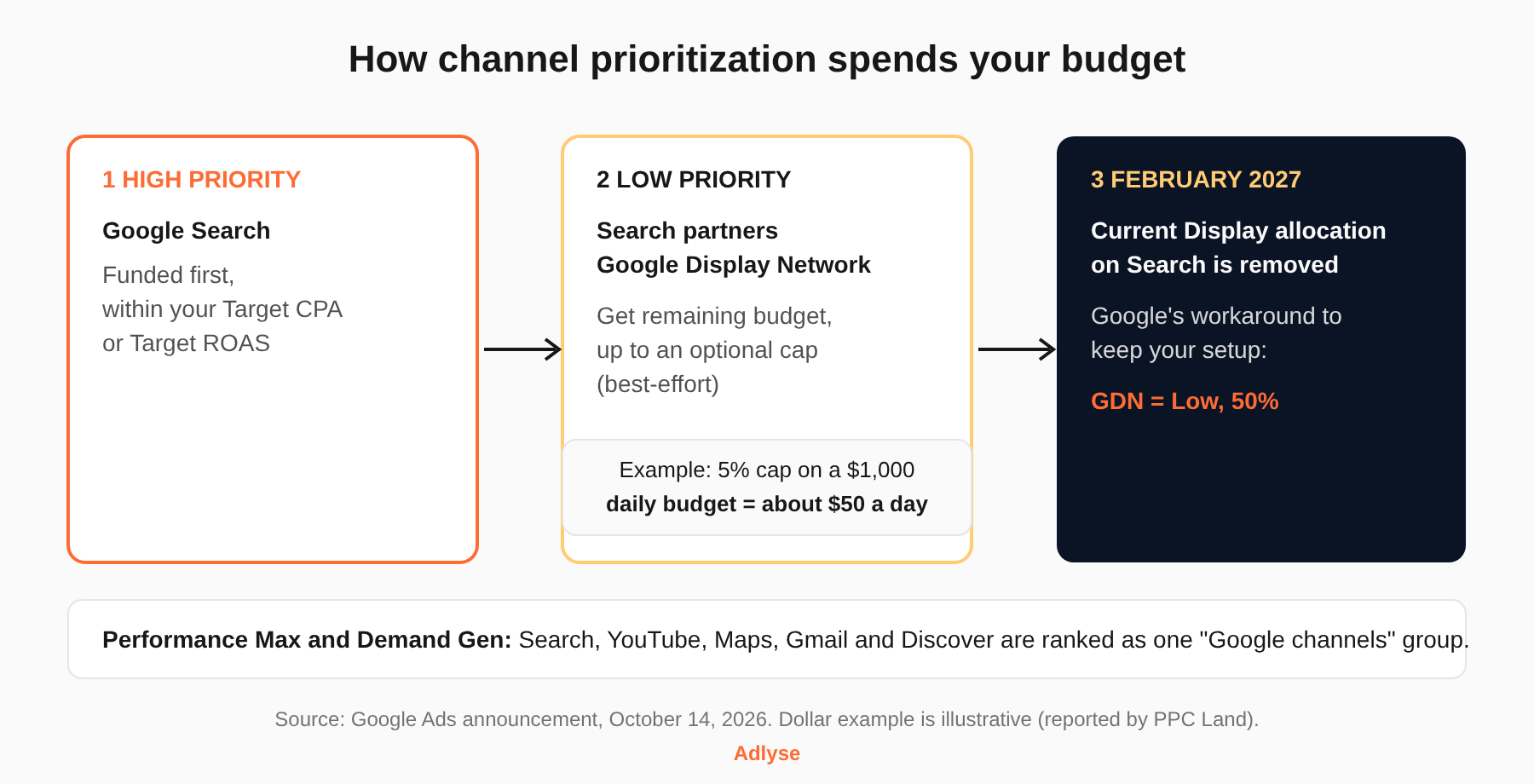
Google Ads channel prioritization lets you mark channels as High or Low priority and put a daily budget cap on the Low ones. Google announced it on October 14, 2026, and it matters for one reason: in February 2027, Google removes the current spend allocation setup for Search campaigns with the Google Display Network (GDN) turned on. Set your priorities before then, or your Display spend may shift.
What should you know before you start?
- The announcement: Tal Akabas, Director of Product Management, Google Ads, published "Guide your campaign spending with new priority and allocation features" on October 14, 2026.
- The two controls: a priority label (High or Low) for a channel, and a maximum percentage of daily budget for Low-priority channels.
- Optional: Google says the features are optional and are rolling out globally to Search, Shopping, Performance Max, and Demand Gen over the coming months.
- The deadline: starting in February 2027, the current spend allocation setup for Search campaigns with GDN on will be removed, and you may see channel spend shift.
- The workaround: Google says to set GDN to Low priority with a 50% budget allocation to keep your current setup.
What does channel prioritization do?
You label channels or channel groupings as High or Low priority. Google says High-priority channels are funded first, within your target when you use Target CPA or Target ROAS. Whatever budget remains goes to the lower-priority channels (Google announcement).
The settings apply at the account level, the campaign level, and to shared budgets, according to the same post.
One limit to know up front. Google says prioritization alone generally changes little for Target CPA or Target ROAS campaigns that are not limited by budget. If your campaign already has all the budget it can use, ranking channels does not move much money. That is where the cap comes in.
What does the budget cap on low-priority channels do?
For a Low-priority channel, you can set a maximum percentage of your daily budget. Google's wording is careful: "On a best-effort basis, our tools will aim to keep spend on those channels within that limit" (Google announcement).
Read that as a target, not a hard stop. Plan for small overruns.
Google also says the cap lets you test Search partners and GDN with clear limits, instead of opting out entirely. That is the practical change. Before, the choice for these channels was mostly on or off. Now it is on, with a ceiling.
PPC Land, summarizing what it says is a Google Help Center page, reports more detail: the percentage is calculated against the campaign's average daily budget, not against actual spend. Its example is 5% of a $1,000 average daily budget, which is about $50 a day. It also reports that a 0% setting stops spend on that channel, and that the cap resets daily with no rollover (PPC Land). These details come from a secondary report, so confirm them in your account before you rely on them.
How does it work for Search, Search partners, and the Display Network?
In Search campaigns, Google Search, Search partners, and GDN can each get a different priority level (Google announcement).
That makes a few setups possible:
| Goal | Search | Search partners | GDN |
|---|---|---|---|
| Protect core search | High | Low, small cap | Low, small cap |
| Keep your old Display share | High | High | Low, 50% |
| Test a channel you had switched off | High | Low, small cap | Low, small cap |
These are Adlyse's example configurations, not Google recommendations. The 50% row is the one Google names. The "small cap" values are yours to pick, so start low and watch results.
How does it work in Performance Max and Demand Gen?
In Performance Max and Demand Gen, Google groups surfaces such as Search, YouTube, Maps, Gmail, and Discover as "Google channels" for prioritization (Google announcement). You prioritize that group, not each surface.
So you cannot rank YouTube above Maps inside a Performance Max campaign with this feature. PPC Land reports the Help Center says the same and points advertisers who want finer control toward Search or Demand Gen (PPC Land). If you run Performance Max at scale, our Performance Max and AI agents guide covers where the control points sit.
Demand Gen support may lag. Search Engine Roundtable reports it is rolling out soon after the other campaign types (Search Engine Roundtable). PPC Land reports the Help Center says budget allocation is not supported for Demand Gen. Google's announcement does not break this out, so check your own account.
How do you set it up?
Google's announcement does not list the click path. Search Engine Roundtable reports this account-level path: go to Account settings, find the Channel Prioritization card, choose the campaign type, assign tiers and any caps, and save (Search Engine Roundtable). Because the rollout is staged, you may not see the card yet.
A sensible order:
- Pull a baseline. For each Search campaign with GDN on, note how much spend goes to Display today. You need this to judge any shift later.
- List campaigns by budget status. Prioritization matters most where a budget limits spend. Campaigns on Target CPA or Target ROAS with spare budget need the cap, not the label.
- Decide the intent for each. Keep the old mix, shrink Display, or test a channel you had turned off.
- Set priority, then cap. Mark the channel Low, then set the percentage.
- Write down the hypothesis. For example: "Capping GDN at 20% will keep CPA within target and free budget for Search." Check it after a full cycle.
- Review weekly. The cap is best-effort, so compare actual channel share with your setting.
What happens in February 2027, and what should you do now?
Google says that starting in February 2027, the current spend allocation setup for Search campaigns with GDN turned on is removed, and advertisers may see their channel spending shift (Google announcement). To keep your current setup, Google says to set GDN to Low priority with a 50% budget allocation.
Here is the number logic, using a made-up $200 daily budget. A 50% allocation on GDN means GDN can take up to $100 a day. It does not mean GDN will spend $100. It is a ceiling.
PPC Land adds two items it attributes to the Help Center: Search campaigns with Display Expansion enabled migrate automatically, and Display Network will stop serving on Search campaigns that use Target Impression Share (PPC Land). Verify both in the Help Center before acting.
Do not wait for February. Set the priorities on your own schedule, in a month when you can watch results, instead of absorbing a shift mid-quarter. If you are in peak season, see our Q4 and BFCM budget pacing guide before you change channel mix.
Where does this fit in your weekly routine?
Channel caps are a budget guardrail. They sit alongside other guardrails for AI-managed ad spend, and they work best when someone owns the review. Add a channel-share check to your Monday routine: planned share versus actual share, by campaign. If you manage accounts with agents, see how they fit in the Google Ads AI agents guide.
What should you do next?
Prioritization settings are changes to money flow, so each one deserves a hypothesis and a grade afterward. Adlyse ships every approved change across Google, Meta, Microsoft, and ChatGPT Ads with a hypothesis, then grades the result as improved, hurt, or neutral, so a cap change like this gets judged on outcomes.