Google Ads API v26 added 15 Search Lift metrics. They report results from a Search Lift study: a Google test that measures whether your ads made more people search for your brand or product. Google announced v26 on October 14, 2026. The new metrics are read-only and sit on top of studies you already run. If you do not have a Search Lift study, the API gives you nothing new to look at.
What is Search Lift?
Search Lift is a free measurement tool in Google Ads. Google's help page says it looks at changes in search activity on YouTube and Google Search, not clicks, impressions, or views.
Here is how Google describes the mechanics:
- You define a product or brand and choose search terms related to your ads.
- Once campaigns run, eligible users are split into a group that can see your ads and a group that is blocked from seeing them.
- Google measures searches in both groups. The difference between them is the reported lift.
That makes it a holdout test. It answers a narrow question: did showing the ad change how often people searched for you?
It does not answer whether those searches turned into sales. Treat it as a middle-of-funnel signal.
Who can run a Search Lift study?
Not every account. Google says Search Lift is not available for all accounts and to use it you contact your Google account representative.
Google's setup page adds these conditions (Set up Search Lift measurement):
- The budget requirement matches the minimum for measuring one Brand Lift question. In the US, that is $10,000 USD.
- You cannot measure two different products or brands at the same time.
- You can create up to 5 search term groups, with a maximum of 10 keywords per group. Google says 1 to 2 groups are typically enough.
- A study can run alone or alongside a Brand Lift and/or Conversion Lift study.
You create the study in the Google Ads interface: Experiments, then the Lift studies tab, then Create a study. Results show up on the lift measurement page.
What did API v26 actually add?
Google's v26 announcement and release notes list four Search Lift changes:
- A new read-only resource, SearchLiftKeywordBundle, representing a keyword bundle in a Search Lift study. In the interface, Google calls these search term groups.
- Two new selectable segments: segments.search_lift_keyword_bundle and segments.search_property.
- 15 new Search Lift metrics.
- Three new enums: SearchLiftKeywordBundleStatus, SearchLiftMatchingInfoSource, and SearchLiftSearchProperty.
The metrics are used with LiftMeasurementConfig, which a campaign links to through Campaign.lift_measurement_config, per the release notes.
Which Search Lift metrics does Google name?
Google names only some of the 15. The announcement says they include relative_search_lift, normalized_incremental_searches, and search_lift_impressions. The release notes name relative_search_lift, search_lift_cost_micros, and search_lift_impressions as examples.
That is four distinct names across the two pages. The other 11 are not listed in the sources I could read, so this post does not name them.
| Metric name (API) | Where Google names it |
|---|---|
| relative_search_lift | Announcement and release notes |
| normalized_incremental_searches | Announcement |
| search_lift_impressions | Announcement and release notes |
| search_lift_cost_micros | Release notes |
The pages I read do not define these four fields. Google's API reference pages for the v26 fields did not load in a readable form, so any definition here would be a guess. The interface help pages do define Search Lift metrics, and the names overlap, so they are the best guide to meaning. Confirm each field's description in the v26 reference before you build on it.
How do you read Search Lift results?
Google's measurement statuses and metrics page gives these definitions for the interface.
Relative lift. Google says it reports the percentage increase in search volume caused by your ads. It is the absolute increase in searches divided by the baseline number of searches. A 25% relative lift means exposed users are 25% more likely to search for your brand or product.
Incremental searches (indexed) per impression and per cost. These compare a slice, such as an age group, with the study average. Above 1 is above average. Below 1 is below average. The "Overall" slice is always 1. The per-cost version shows cost-effectiveness.
By search property and by search term. The first shows how much YouTube or Google Search contributes to lift for a term, and values are expected to total 1. The second shows how much each term contributes to its group, and values may not total 1 because one search can match several terms.
Confidence interval. A range of likely lift values around the point estimate. Google gives 35% with a range of 30% to 40% as an example. The range narrows as data accumulates.
Certainty of lift. Google defines it as 1 minus the p-value. Google adds that it is not available in all accounts. Where it is unavailable, only results with more than 90% certainty appear.
Google also describes three statuses:
- X% Relative Lift: enough data to detect lift with high confidence.
- Not enough data: impressions or searches are below the minimum to show results.
- No lift detected: enough impressions, but no statistically significant difference between exposed and unexposed users.
"No lift detected" is a result, not an error. It means the test could not separate your ads from noise.
What is API-only, and what is not?
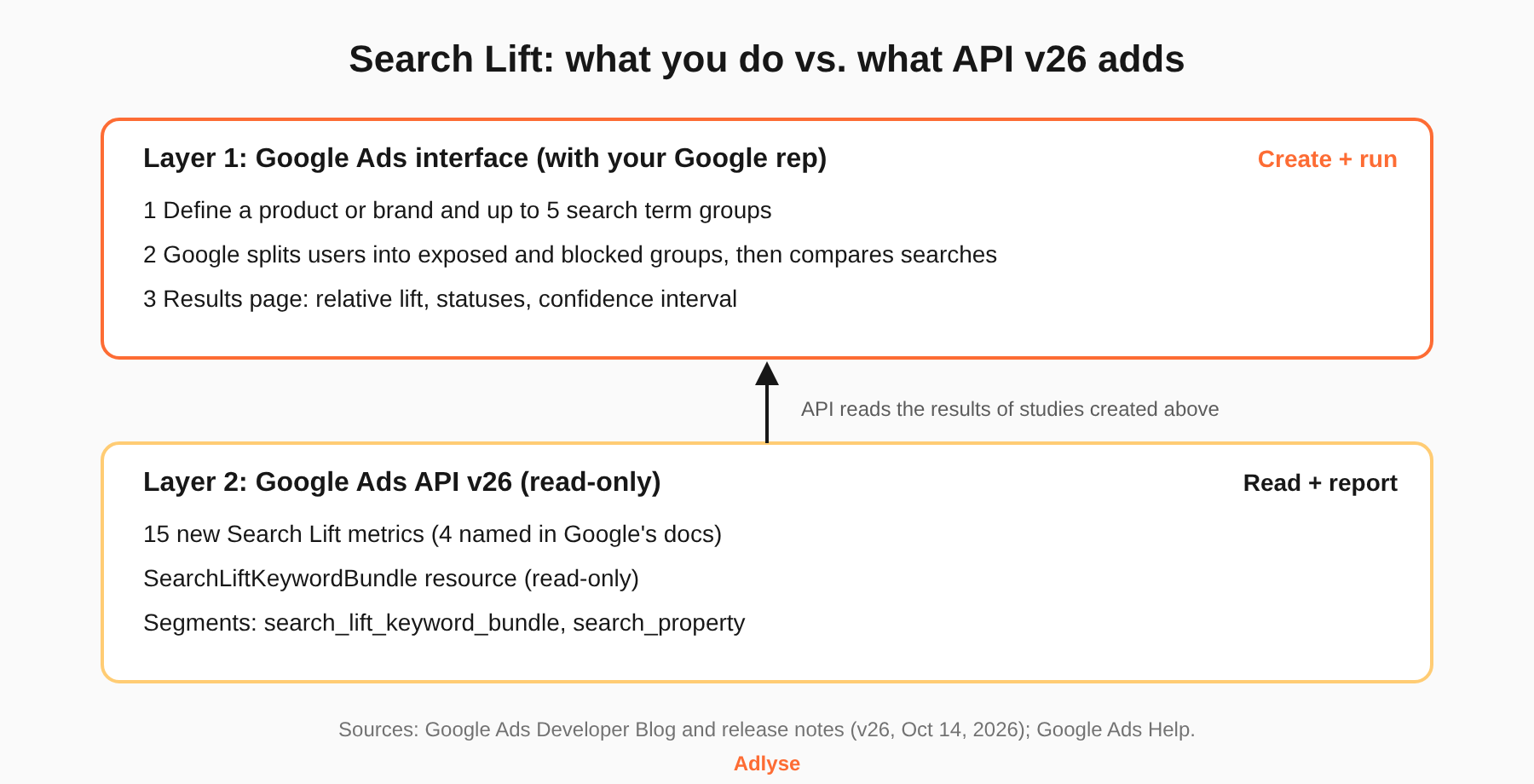
The study itself is not API-only. You build it in Google Ads or through your account representative. Per the release notes, the new SearchLiftKeywordBundle resource is read-only. Secondary reporting from PPC Land says v26 adds no way to create Search Lift studies through the API. Treat that as a reading of the release notes, not a Google statement.
So there are two layers:
| Layer | Where it lives | Who uses it |
|---|---|---|
| Creating and running a study | Google Ads interface, with your Google rep | Anyone with access |
| Pulling the metrics and segments by keyword bundle or search property | Google Ads API v26 | Developers, reporting tools, agencies with data pipelines |
To use the new API capabilities you must upgrade your client libraries and client code, per Google's announcement as quoted by PPC Land. Most marketers will never write that code. They will see the effect when a reporting tool starts showing Search Lift next to spend and conversions.
What should a non-technical marketer take away?
Four things.
- Ask whether you can run a study. If you spend at scale on YouTube or Demand Gen, ask your Google rep about Search Lift. Check the $10,000 US minimum first.
- Read lift as search demand, not revenue. Search Lift measures search behavior. It does not measure sales.
- Use the status before the number. "No lift detected" and "Not enough data" mean different things. Do not report either as zero.
- Ask your reporting tool what it will pull. If it uses the API, ask when it will adopt v26 and whether it shows the confidence interval along with the headline lift.
This is a different job from a live incrementality test. A Search Lift study measures one outcome, search activity, in a Google-run holdout. For the wider method, see Adlyse's guide to incrementality testing.
How does this fit with the rest of your reporting?
A Search Lift number is one more figure that has to reconcile with others. It comes from Google's own test, so it will not match what Meta or your analytics tool says. That is the same problem as cross-platform reporting that does not add up and ROAS numbers that disagree. Google's other new measurement signal, Data Strength uplift, has the same caveat: it is useful, and it is Google grading Google.
Write down which study produced each number, the date range, and the segment. That record is what lets you defend a figure later. See the audit trail for AI-driven ad spend.
What should you do next?
If you want an agent working on the ad side while you decide how to measure it, Adlyse ships every proposed change with a hypothesis and grades the result as improved, hurt, or neutral. That gives your lift readings a decision log to sit next to.