Bing Webmaster Tools has a free AI Performance report that shows how often your pages are cited in Microsoft Copilot, AI summaries in Bing and some partner integrations. It lists grounding queries, cited pages and, since a June update, citation share. It does not show clicks. It is free, and it is a first-party source, which is why it is worth setting up.
What is the AI Performance report?
It began as a limited beta that Search Engine Roundtable reported on January 28, 2026, when Microsoft had not formally announced it. By February, Search Influence's Will Scott described it as a public preview available to any verified site. On June 22, 2026, Practical Ecommerce described an improved version.
We could not open Microsoft's own help page, so the details below come from these three reports. Check them against Microsoft's page.
What does the report show?
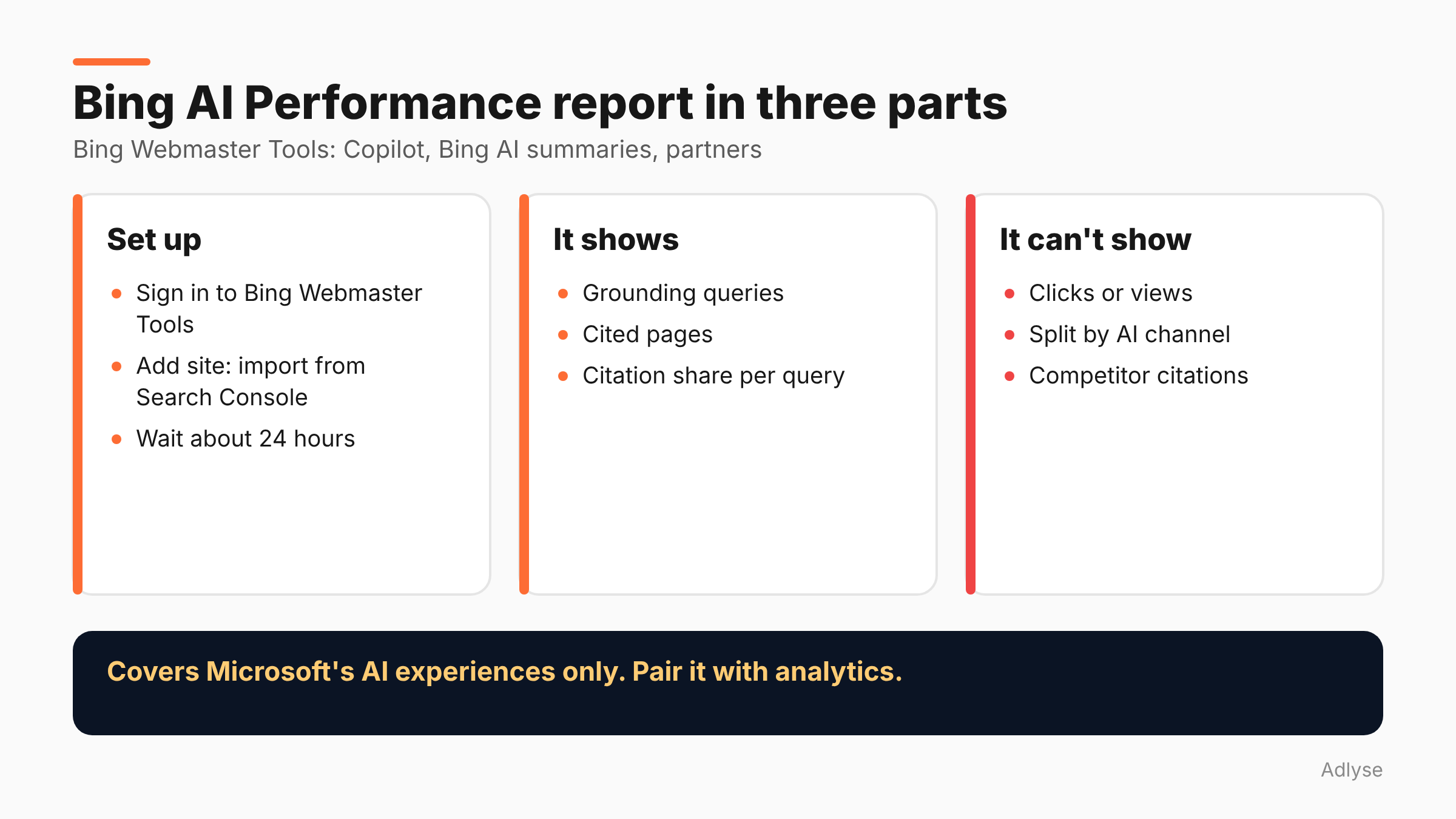
Per Practical Ecommerce's June 22 description, it tracks citations in Microsoft Copilot, AI-generated summaries in Bing and select AI partner integrations. It has two main views.
Grounding queries. These are the phrases the AI used to retrieve content it cited. For each one, the report shows:
- Query intent, such as navigational, informational, commercial or comparison.
- Query topic.
- Average number of unique pages cited per day.
- Citation share: "the percentage of citations attributed to your site out of all citations shown for a specific grounding query."
Pages. The URLs cited in AI answers and how often each appears. Click a URL to see its grounding queries, or click a query to see the pages cited for it.
You can sort by intent, topic, citations or citation share, and export the report to a spreadsheet.
Note that a grounding query is not the user's question. SER's January report describes it as the underlying search term Microsoft used to ground the response, not the full user query.
How do you set it up?
Per Practical Ecommerce:
- Sign in to Bing Webmaster Tools with a Microsoft account.
- Click "Add site" and choose "Import your sites from GSC." This requires Search Console.
- Allow roughly 24 hours for data to appear.
If your site is already verified in Bing, check the AI Performance section directly.
What did one site's data look like?
Search Influence published its own numbers, which is useful as an example and not as a benchmark. It analyzed 91 days of Copilot citation data for its own site, from November 12, 2025 to February 10, 2026: 19,717 citations, 86 unique cited pages and over 400 unique grounding queries.
Four observations from that post:
- Spiky. Citations peaked at 5,804 on December 7, then fell. The author reports a daily average of 1,520 for December 1 to 8 and 34 for February, a 97% drop. The causes are unconfirmed.
- Concentrated. One page, an AI SEO tools comparison, accounted for 69% of citations. The top four pages made up about 90%.
- Few pages per day. Even on days with more than 5,000 citations, only 15 to 18 unique pages were cited.
- Query fan-out. The grounding queries looked machine-generated, with several rephrased versions of the same question. The author estimates one conversation may produce three to five citation events.
This is one site, in one niche, in one period, so do not expect your numbers to look the same. The useful part is the pattern: citations can be concentrated and volatile.
What can't it tell you?
Taken together, the sources list these limits:
- No clicks. It shows citation frequency, not views or visits. SER says citations are effectively impressions.
- No channel split. You cannot filter to one AI channel, and partner platforms are not identified.
- No competitor view. You cannot see who else was cited for the same query.
- Copilot-centric. Search Influence notes there is no equivalent data yet from ChatGPT, Perplexity, Gemini or Google AI Overviews.
- No API (as of February). Exports are CSV, per Search Influence. Check whether that has changed.
How should you use it?
This section is our opinion.
Find your citable pages. Sort pages by citations. The top few tell you what Microsoft's systems consider useful from your site. Read them as a buyer would. Why are they clear?
Read grounding queries as a topic list. Group them by topic and intent. If many are comparison queries and you have no comparison page, that is a gap.
Look for low citation share. Queries where you appear but with a small share are places a better page might win.
Watch concentration. If one page holds most of your citations, you are exposed to a single change. Ask what supports it.
Pair it with Google's report. Google's equivalent is covered in our post on the Search Console AI report. Neither report shows clicks, so use analytics for visits.
Set a monthly review. Export the CSVs on a fixed day and keep them. Daily data is noisy, and the report covers a limited window.
Does this matter for paid media teams?
Somewhat. If you run Microsoft Advertising and also want organic presence in Microsoft's AI answers, you need a number for the organic side. This report is that number, with its limits. We found no source that ties the report to ad performance, so keep the two separate.
Do not mix it into ROAS. A citation is not a conversion. If you want to know whether AI answers affect sales, run a comparison as described in our incrementality testing guide, and keep orders as the source of truth. For the reporting side, see why cross-platform numbers disagree.
What should agencies report to clients?
One line per month: pages cited, top five pages, top grounding-query topics and citation share trend. Add a note that the data covers Microsoft's AI experiences only, and has no click data. Do not compare it with Google numbers as if they were the same measure.
If a client asks "is it worth it?", the honest answer is that it is free, takes a short time to set up and tells you something you cannot see elsewhere. Whether citations create revenue is not answered by the report.
What do we still not know?
- The current feature set. The sources describe three points in time: January beta, February preview and June update. Microsoft's help page may differ.
- How Microsoft counts a citation. Not described in the sources we read.
- Whether a click report is coming. No source says so.
What should you do next?
Set the report up this week, export the first CSV and list your five most-cited pages. If you run changes through Adlyse, each approved change ships with a hypothesis and is graded improved, hurt or neutral. Write the hypothesis for any page you change because of this report, then check it a month later.