Google Ads can now put a visible "made with AI" overlay on ads that use AI-created or AI-edited assets, and the list of places where that applies is growing. Google's own policy page names the European Union, India and New York. A report on November 5, 2026 says California, South Korea and Vietnam were added. The advertiser carries the compliance duty, not Google.
What is Google's AI content label?
It is a disclosure that tells people an ad was made or edited with AI. Google's policy page, Updates to AI labeling requirements (July 2026), says the EU, India and New York require certain ads with AI-generated or AI-edited assets to carry a disclosure.
Per that page, from July 2026 Google lets advertisers add a text or visual AI label inside image and video creatives. An AI label setting rolled out gradually through July. You can use it in Google Ads, Display & Video 360, Campaign Manager 360, Merchant Center and Ads Editor. Labels added this way are not treated as violations of Google's text overlay and watermark policies.
Which regions are covered now?
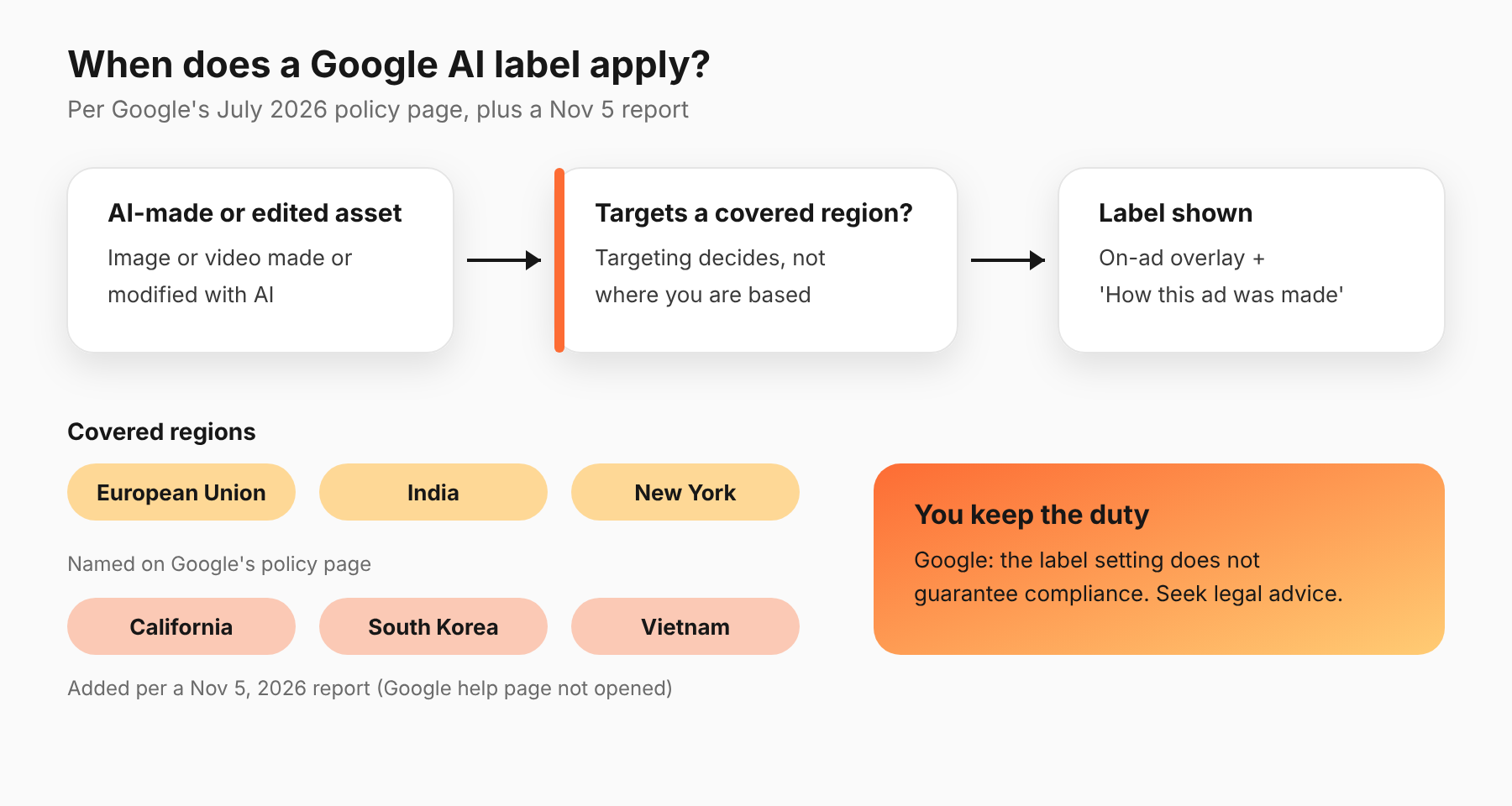
Google's page lists three: the European Union, India and New York.
On November 5, 2026, Search Engine Roundtable reported that California, South Korea and Vietnam were added to that list, and that ads with assets marked as AI-created or edited will show visible overlays in those locations. It cites Google's help page Use AI content label settings and disclosures as the source. We could not open that page, so check it before you rely on the six-region list.
The overlay depends on where the campaign targets, not where you are based. A US advertiser targeting New York or California is in scope.
What triggers a label?
Per Google's policy page, a label applies to image and video creatives generated or modified using AI. Google Ads may also apply labels automatically to some assets created with Google AI tools.
PPC Land, reading Google's July 9, 2026 changelog, adds detail. Treat it as secondary reporting:
- A "How this ad was made" disclosure appears in My Ad Center, from the three-dot menu on Search, YouTube and Discover ads, wherever the ad runs.
- A visible on-ad overlay applies to campaigns targeting the EU, India or New York (and now, per the November 5 report, more regions).
- Automatic labels can't be removed or overwritten. They may apply when Google is legally required to label, when it receives signals from other platforms that AI was involved, or when you use a fully automated Google tool to create and serve creative.
- Custom labels must sit outside a margin of about 5.5% around the asset's edge, and Google's automatic image enhancements can remove them.
- SynthID watermarks and C2PA metadata are applied automatically to images and video made with Google's AI tools.
Who is responsible for compliance?
You are. Google's policy page says using the AI label setting does not guarantee compliance with specific regulations. It tells advertisers to seek legal guidance and make sure ads and assets meet local obligations.
PPC Land reads this as the advertiser bearing the obligation even when Google applies a label automatically. That is its reading, not Google's wording. The practical point holds either way: a label from Google does not move the risk off your account.
Election advertisers have a separate duty. Google's page says they should keep disclosing election ads with synthetic or digitally altered content by ticking the "Altered or synthetic content" checkbox in campaign settings.
This is not legal advice. For the state-law side, see our post on California's SB 1050 and AI ad disclosure.
What should you check in your accounts this week?
This list is our recommendation, not Google's.
- List your AI-touched assets. Find every image and video made or edited with AI, including generative edits and auto-created assets inside Performance Max or Demand Gen.
- Map assets to campaigns, then to locations. Mark any campaign that targets the EU, India, New York or the newer regions, and note which of them carry AI assets.
- Review the AI label setting. Look at where it is turned on, and who decided.
- Check creative safe zones. If you add your own labels, keep them outside the roughly 5.5% margin PPC Land reports, or they may be cropped.
- Record the decision. Write down who approved each label choice and when. An audit trail is what a legal team will ask for first.
Do this before Black Friday. A new overlay appearing on a top-spending ad in the middle of Cyber Week is a bad time to learn about it.
How do AI labels interact with automated tools?
This is where most accounts will get surprised. Automated formats make or edit assets without a person pressing a button. If you use fully automated Google tools, Google may label the result for you, and you can't remove that label, per PPC Land's reading of the changelog.
If an AI agent edits creative on your behalf, the same question applies: who knows which assets are AI-made? Our guide to compliance and privacy in agent-run accounts covers the questions legal teams ask, and AI autonomy guardrails covers where to cap what an agent may change.
What does this mean for agencies running many accounts?
This section is our opinion. The risk multiplies with the number of accounts, because the label rules depend on where each campaign targets and which assets each one uses.
Build one inventory per client: asset, how it was made, which tool touched it, which campaigns use it and which locations those campaigns target. Keep it in a shared sheet that a person on the client side can read. Agree in advance who may approve an AI-made asset, and put that in the client's brief.
Then add one check to your launch routine. Before a campaign goes live in a covered region, someone confirms that every AI-made or AI-edited asset has been identified. It takes minutes at launch, and it is slow and awkward to reconstruct after a complaint.
What do we still not know?
Three things are unclear from what we could read:
- The exact November 5 change. The six-region list rests on one report, with Google's help page unread.
- Enforcement. Neither Google's page nor the secondary reports describe how or when non-labeled ads will be actioned.
- How labels affect performance. No source we found gives data on whether labels change click or conversion rates. Don't assume either direction.
What should you do next?
Audit AI-made assets by campaign and location this week. If you run changes through Adlyse, each approved change ships with a hypothesis and is graded improved, hurt or neutral. Use the same habit for labels: write down what you expect a label to do before you turn it on, and check the result afterward.