
Automate the assembly of a client report. Keep the judgment human. The data pull, the de-duplication against the client's CRM, and the first draft of the weekly summary are mechanical, so a machine should do them the same way every week. The anomaly notes and the client-facing narrative are judgment, so a person should write them. Most agency client reporting automation fails when it automates the second group or leaves the first group manual.
What should you know before you automate client reports?
- The platforms already schedule reports. Google Ads lets you email a report once or on a recurring schedule. Looker Studio can schedule automatic report delivery. Meta has a Help Center page on running a recurring report and sending it to different email addresses in Ads Reporting.
- Scheduled delivery is not reporting. A scheduled export moves numbers. It does not reconcile them, explain them, or tell the client what to do next.
- Recent numbers move. Google says it reports conversions by impression date, so a week that just closed is incomplete.
- Your CRM is the tiebreaker. Platforms count their own conversions. Your client's order or lead system counts each sale once.
Which parts of a client report can you automate?
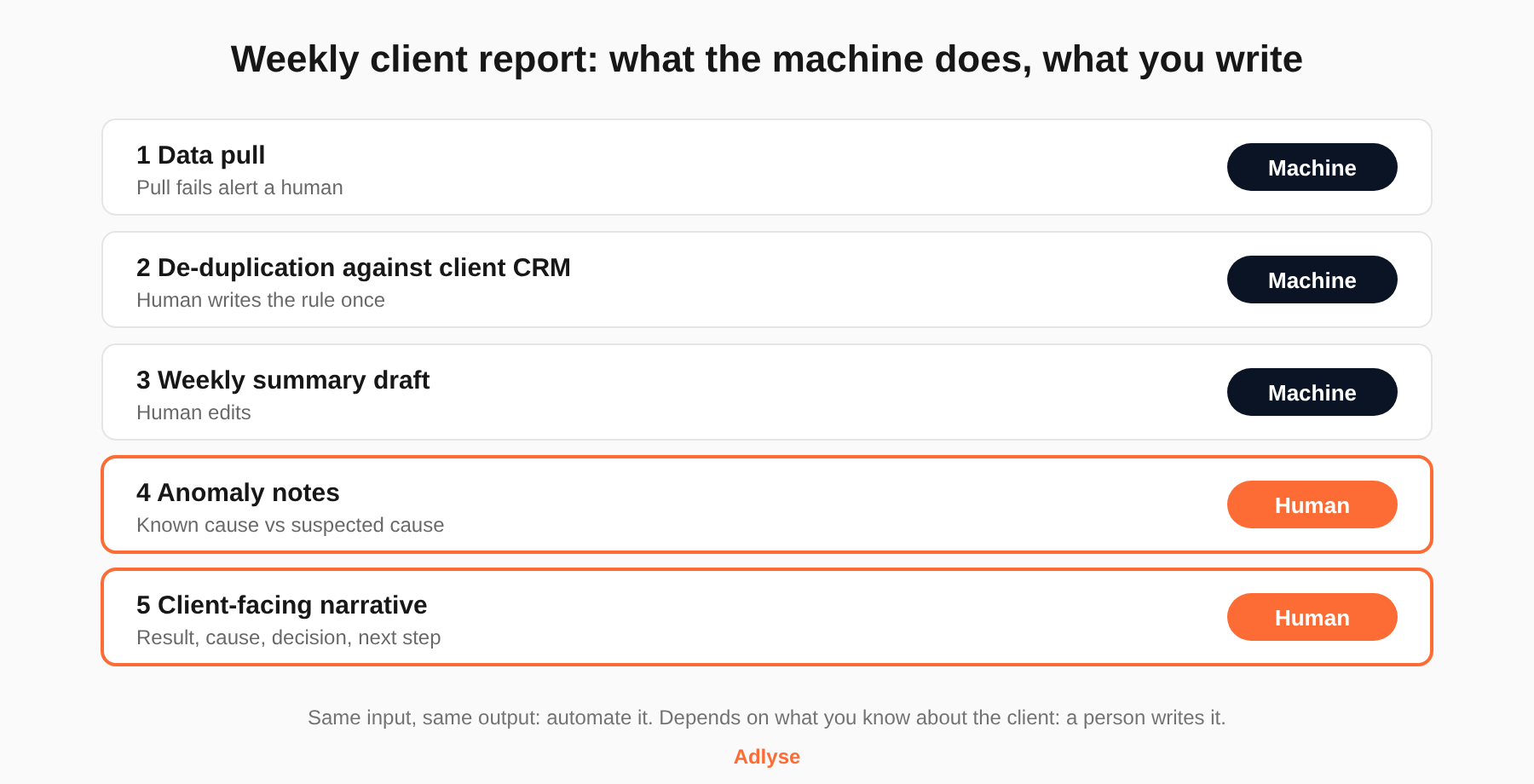
Five jobs make up a weekly client report. Three are mechanical. Two are not.
| Job | Automate? | Who owns it |
|---|---|---|
| Data pull | Yes | Machine, with a human checking failures |
| De-duplication against the client CRM | Yes, once the rule is written | Human writes the rule, machine applies it |
| Weekly summary draft | Yes | Machine drafts, human edits |
| Anomaly notes | No | Human |
| Client-facing narrative | No | Human |
The line is simple. If the same input should always produce the same output, automate it. If the right answer depends on what you know about the client, a person writes it.
How should you automate the data pull?
Use the platforms' own plumbing first, and know where it stops.
Google Ads. Reports from a manager account can cover all of your client accounts, including those linked to sub-manager accounts. They download as .csv, .tsv, .xml, or .pdf. Scheduled emails go to users with access: Google's page says recipients are other people who have access to your account. A client who is not a user on the account is not a recipient. Scheduled reports for an account with a time zone start at 3:00 a.m. in that zone.
Looker Studio. Google's documentation now calls the product Data Studio. Its scheduling page says the email attaches the report as a PDF and links to the full report. Four limits matter for agencies:
- Without Pro, the highest frequency is once per day.
- You can add no more than 50 recipient addresses.
- The schedule uses your operating system's time zone, which you cannot change in Data Studio.
- If the downloaded report contains an error, the report won't be sent. A failed chart can mean a silent miss, so check that delivery happened.
For large reports, Google suggests splitting them and staggering delivery by at least 30 minutes.
Meta. For anything beyond the scheduled email, use the Insights API. Large synchronous queries can time out. Async requests can take up to an hour to complete, and Meta says report run IDs expire after 30 days, so store the results, not the IDs. Insights are reported in the ad account's time zone, which matters when you schedule a daily pull.
What to automate here: the pull itself, a stamped pull date on every output, and an alert when a pull fails or returns zero rows. What to keep human: deciding which accounts and metrics belong in a client's report in the first place.
How do you de-duplicate against the client's CRM?
This is the step that makes a report defensible. It is also the step agencies skip because the platform numbers look finished.
Platforms disagree with each other and with your client's system for documented reasons. Google's discrepancy guide says Google Ads reports conversions on the ad impression date while other tools use the conversion date. It adds that conversions can be reported up to 90 days after the click, that view-through conversions are not in the Conversions column by default, and that Google Ads reports a conversion only if there was a Google Ads interaction. Meta's Insights API follows Ads Manager settings, with attributed values using ad-set-level attribution. Two platforms can both claim one sale. For the full mechanics, see why nothing adds up.
Here is the shape, with made-up numbers for illustration only. Google Ads claims 40 conversions. Meta claims 25. Your client's CRM shows 52 orders. The platforms' sum is 65, so at least 13 sales were claimed twice. The report shows 52, with each platform's claim listed beside it as a claim.
Automate this:
- Pull the CRM orders for the same period and time zone.
- Match each platform conversion to an order using order ID or a click ID, whichever the client captures.
- Count each order once.
- Log the unmatched rows in both directions.
A human writes the rule first. Which source is ground truth, how to treat leads that become sales weeks later, and what to do with orders no platform claimed are business decisions. Write them down once and apply them identically every week. A consistent rule beats a perfect rule applied differently by whoever builds that week's deck. The hours this saves are the ones described in the real cost of manual reporting reconciliation.
What should the automated weekly summary include?
The weekly summary is a draft the machine writes and a person edits. Keep it short and the same every week:
- Spend, reconciled conversions, and cost per reconciled conversion, against the previous period.
- The method line: time zone, attribution basis, and pull date.
- A "still settling" flag on the most recent days.
- A list of changes made in the account that week.
- Open anomalies, linked to their notes.
The "still settling" flag matters. Google says conversion lag makes cost per action seem higher and return on ad spend seem lower than they really are. Meta says insights do not change after 28 days of being reported, so assume figures can still move until then. A client who sees a bad Monday number and a better Friday number loses trust in both.
Pick a lag and hold it. Use live views to act on the account. Use the lagged view to report on it. If your team already runs a Monday routine, this summary slots into it. See weekly ops with agents.
Why should a human write the anomaly notes?
A machine can flag that cost per conversion rose 30% or that spend stopped. It cannot know that the client ran an offer, that the product sold out, that the site checkout broke on Thursday, or that the sales team changed what counts as a qualified lead.
Detection is automatable. Explanation is not. Let the system flag the anomaly and open a stub. Then the account lead fills in five fields:
- What changed: the metric, the dates, the size.
- Likely cause: what you know, labeled as known or suspected.
- Evidence: the change log entry, the client message, or the tracking check.
- Action taken or proposed: and who approves it.
- Client impact: what the client should expect next week.
The "known or suspected" label is the part most agencies skip. A suspected cause written as fact is how an agency ends up retracting a note in the next meeting.
A change log makes this faster. If every account change carries a hypothesis and a result, the note can point to a specific change rather than a hunch.
Why should a human write the client-facing narrative?
The narrative answers three questions: what happened, why, and what we are doing next. The first is in the data. The second and third are your agency's judgment, and that judgment is what the client pays for.
Machine-drafted narrative has two problems. It tends to sound confident about causes it cannot know, and it flattens the client's context: their goals, their sensitivities, what their CFO asked last month. A client can tell when a paragraph was written about their account and when it was written about accounts in general.
Use the machine for the first draft of the facts. Then a person rewrites the narrative in this order:
- One sentence on the result, in the client's terms.
- One or two causes, each marked known or suspected.
- One decision you need from them, if any.
- What you will do next, with dates.
If part of the work is now done by agents, say so plainly and show the controls. The client transparency playbook covers how. And if you run this process across many accounts, the same split applies per client; see what changes in multi-client campaign management with AI agents.
What does a weekly client reporting workflow look like end to end?
- Automated, early week: data pulls complete, CRM orders load, de-duplication runs, unmatched rows are logged, anomalies are flagged.
- Human, early week: the account lead reviews unmatched rows and writes anomaly notes.
- Automated: the weekly summary draft assembles with the method line and "still settling" flags.
- Human: the lead edits the draft and writes the client narrative.
- Human: the lead sends it. Nothing goes to a client unreviewed.
The time you save comes from steps 1 and 3. The value you add comes from steps 2, 4, and 5. Do not invert them.
What should you do next?
If agents handle execution in your accounts, the anomaly notes get easier to write when each change carries a hypothesis and a graded result. Adlyse ships every change with a hypothesis and grades it improved, hurt, or neutral, so the human note has a record to point at.