
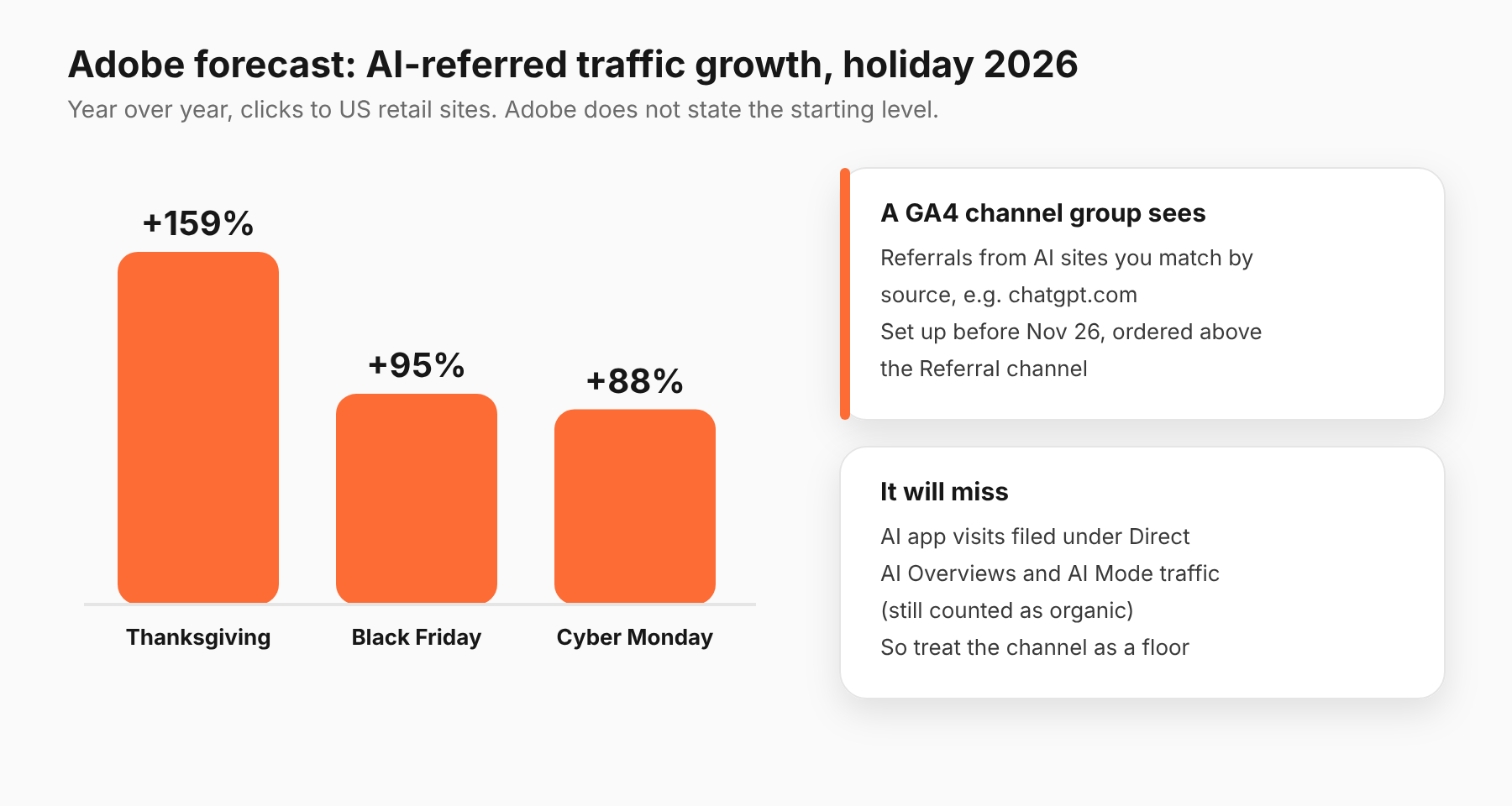
Adobe forecasts AI-referred traffic to US retail sites will grow 130% over the 2026 holiday season, with Thanksgiving up 159%, Black Friday up 95% and Cyber Monday up 88% (Adobe, September 28, 2026). Adobe does not say how big that traffic is today. To see your own share, build a custom channel group in GA4 before Thanksgiving, November 26. It will miss some visits, so treat it as a floor.
What does Adobe forecast for AI-referred traffic?
Per Adobe's release, AI traffic to retail sites will grow 130% year over year across the season. Adobe describes it as shopper clicks from AI chat and browser services to retail sites. By day:
- Thanksgiving: up 159%
- Black Friday: up 95%
- Cyber Monday: up 88%
Adobe's separate forecast document says AI-driven traffic grew 127% year over year in August 2026, and that AI-referred visitors that month converted 48% higher than non-AI traffic and generated 43% more revenue per visit. That document does not define "AI traffic," and no figure is given for the starting level.
Read the growth rates with care. A big percentage on a small base can still be small. Until you see your own numbers, you don't know if it is 1% of your visits or 10%.
One more caution. The 159% for Thanksgiving comes from the release. Adobe's forecast document, as we read it, gives 141% for Thanksgiving. Check Adobe's current figures before you quote either.
Why should paid media teams care?
Because AI traffic changes how you read your channels.
If shoppers ask an AI tool what to buy, click a link and buy, that visit lands in your analytics as a referral, not as a paid click. If you are also running ads in those answers, you need to separate the two.
It also affects budget calls. If AI-referred visitors convert better, as Adobe reports for August, a channel report that hides them inside "Referral" or "Direct" can make your paid channels look better or worse than they are.
How do you set up a custom channel group in GA4?
This is the method Orbit Media describes. We could not find Google documentation for the exact steps, so check the menu names in your own GA4 property.
- In GA4, open Admin, then under Data display open Channel groups.
- Create a new channel group and give it a name, for example "AI sources."
- Add a channel called "AI tools," and set its condition to Source matches regex.
- Enter a regex that matches the AI domains you care about. A starting point, which you should test against your own data: chatgpt\.com|chat\.openai\.com|perplexity|gemini\.google\.com|copilot\.microsoft\.com|claude\.ai.
- Save the channel, then use Reorder to move it above the Referral channel. GA4 checks channels from the top down, so AI sources are sorted before they fall into Referral.
- Save the group. Wait a few minutes, then open Reports, then Acquisition, then Traffic acquisition, choose a long date range, and use your new channel group as the primary dimension.
Orbit Media notes that creating a channel group does not change your underlying data, and you can delete it if it isn't working.
Do this by Wednesday, November 25. A channel group is applied to reporting from the time you build it, so you want it in place before Thanksgiving.
What will GA4 miss?
Orbit Media lists three limits, and they matter for a holiday read:
- App traffic shows as Direct. Visitors who come from AI apps, not websites, often show up as direct traffic, so you cannot separate them.
- Google's AI features count as organic. Traffic from AI Overviews and AI Mode is still reported as organic.
- GA4 underreports in general. And pages can show as "(not set)" when a returning user opens an old tab, which loses the source.
That means your AI channel is a floor. A rise in "Direct" on Thanksgiving may include AI traffic you can't see. Don't conclude AI is small just because the channel looks small.
How should you read the numbers?
This section is our opinion.
Start with share, not growth. Look at AI sources as a percentage of sessions and of purchases for the last 30 days. Growth rates mean little without that.
Compare like with like. Adobe's 48% figure is for August and for its own dataset. Don't expect your store to match it, and don't promise it to a client. Compare AI-referred visitors against your own other organic visitors, in the same period.
Watch sample size. A few dozen sessions swing wildly. Wait for hundreds before you make a decision.
Look at the landing page. If AI visitors land on product pages, you may want to check those pages' speed and stock status for the weekend.
Keep it out of your paid ROAS. AI-referred visits are not paid clicks. Our guide to reading cross-platform numbers and why cross-platform reporting doesn't add up explain how to keep sources separate. For causal questions, see incrementality testing.
What should you report to a client?
This section is our opinion. A client who reads "AI traffic up 130%" in the news will ask about it. Give them a short, honest answer built from your own data.
Report three numbers: AI-referred sessions as a share of total sessions, AI-referred purchases as a share of total purchases, and the conversion rate of AI-referred visitors next to your other organic visitors, for the same dates. Say what the channel group cannot see: app traffic filed under Direct and Google's AI features filed under organic.
Do not quote Adobe's 48% conversion figure as an expectation for the store. It is Adobe's August data. Say what your own numbers show, and say how many sessions they rest on. If the sample is small, say that too.
What should you do before Thanksgiving?
- Build the channel group (by November 25).
- Save the last 30 days of AI-referred sessions and purchases as a baseline.
- Add a note in your reporting that app-referred traffic lands in Direct.
- Decide who looks at the AI channel on Friday and Monday, and what would make you act. Our Q4 and BFCM pacing plan covers how to set those checks.
What should you do next?
Build the channel group this week and save a baseline. If you run changes through Adlyse, each approved change ships with a hypothesis and is graded improved, hurt or neutral. A baseline is what lets you grade anything that happens on Black Friday.