

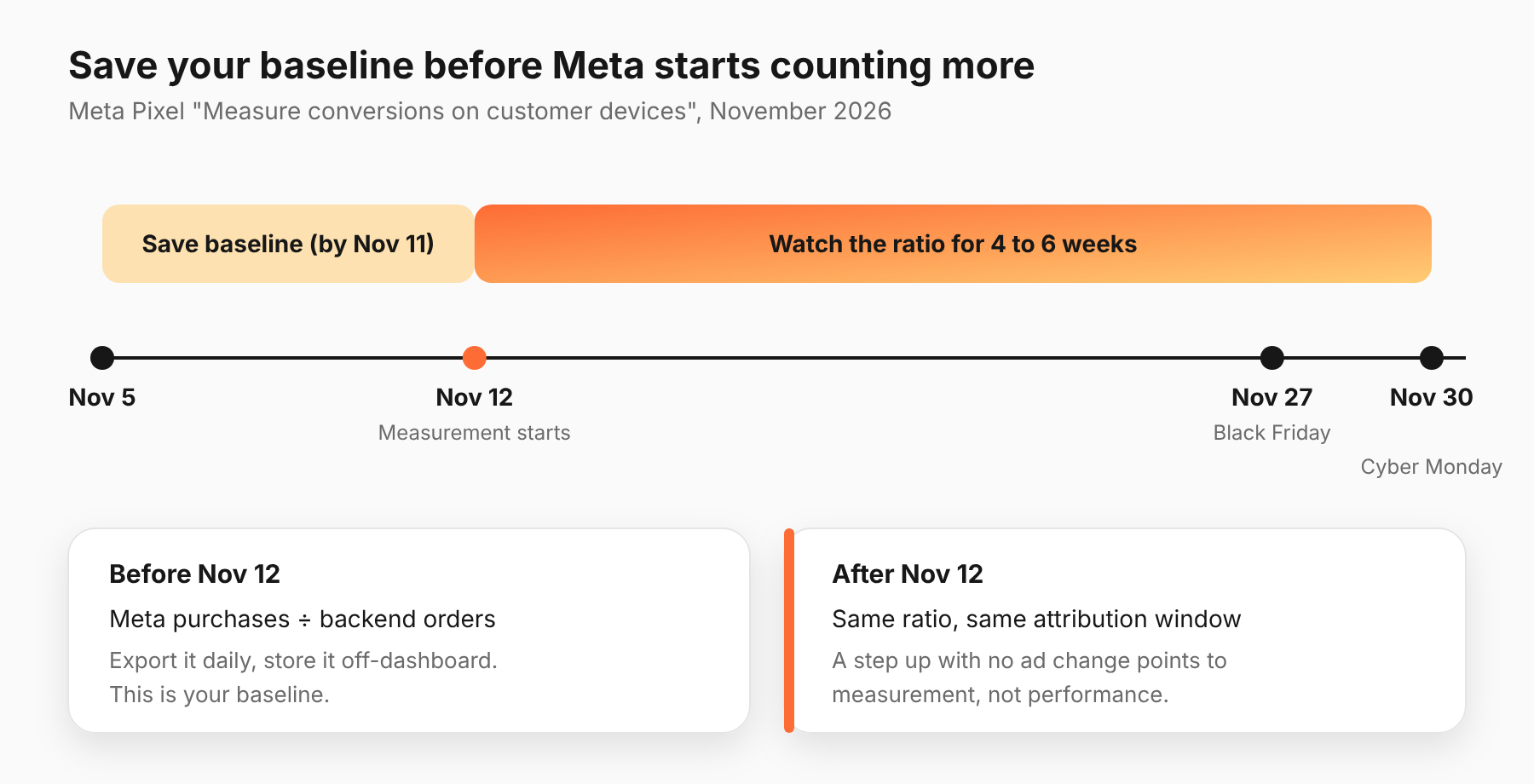
From November 12, 2026, Meta Pixel starts counting some purchases it could not see before. The setting is called "Measure conversions on customer devices." It is on by default for eligible pixels outside the EU and UK, and you can switch it off per pixel. Expect your reported Meta conversions to rise without any change in ad performance, so save a baseline now. Black Friday is November 27, fifteen days later.
What is "Measure conversions on customer devices"?
It is a Meta Pixel setting that matches an ad view to a purchase on the shopper's own device. Per Meta's Business Help Center article, as summarized by Relevant Audience, the matching uses information the customer already gave the advertiser, plus temporary device information. Meta says it is meant to capture conversions that would otherwise go unmeasured.
Meta says only two things come back from that step: that a purchase happened, and which campaign should get the credit. It also says the attribution window and attribution model do not change, and that the setting works alongside the existing Pixel and the Conversions API.
Read that carefully. The rules for crediting a conversion stay the same. What changes is how many conversions Meta can find.
When does it start, and who does it apply to?
The start date is November 12, 2026. The help article does not give a date. The date comes from the Events Manager panel, which reads "Measurement starting November 12, 2026," as reported by PPC Land. PPC Land adds that the rollout may be gradual from that day.
According to the same summaries of Meta's help article, the setting has these limits:
- Location. It does not apply to people in the EU or UK.
- Pixel placement. The Pixel must sit directly on the page, not inside an iframe or as an image-only pixel.
- Site type. Visitors must log in with an email address or mobile number. A pure guest-checkout site may not qualify.
It is on by default for datasets already sending events. MetricMaven reports it as a Meta advertiser email. There is no opt-in step.
Why does this matter before Black Friday?
Because it can change your numbers in the middle of your biggest sales period, and nothing about your ads will have changed.
If Meta finds more purchases, your Meta-reported conversions and ROAS can go up on November 12 or soon after. Black Friday spend ramps up in the same weeks. Two things will move at once: real demand and what Meta can count. If you have no baseline, you will not be able to tell them apart.
There is also a decision risk. A budget call based on "Meta ROAS jumped" is a call based on a reporting change. Our guide to reading cross-platform numbers covers why platform-reported figures need a second source before you act on them.
One more point. Meta has not said whether recovered conversions feed bidding, delivery or audiences, or only reporting. Until Meta answers, treat a shift in delivery after November 12 as possible, not certain.
What should you save before November 12?
This list is our recommendation, not Meta's. Do it by Wednesday, November 11, and store it somewhere your dashboards can't overwrite.
- Daily Meta conversions by action type. Export them with your normal attribution window and date basis, and write down both.
- A dated Events Manager snapshot. Save event volume and match quality for each pixel.
- A platform-to-backend ratio. Divide daily Meta-reported purchases by daily orders in Shopify, your CRM or your backend. This is your best check, because backend orders do not change when Meta's counting does.
- An annotation. Mark November 12 on every chart that uses Meta conversions, and tell clients.
- A pixel placement list. Note every page the Pixel runs on, including login and account pages, and check the Pixel loads once per page. Duplicate loads inflate any baseline.
Do not change email matching or other identifier settings near the rollout. It will muddy the before-and-after comparison.
Should you opt out?
Not by reflex. Decide on purpose.
Switching it off keeps your numbers comparable with last year. Leaving it on may give Meta a fuller view of your purchases. Which is better for you depends on your data and your clients. We would opt out only if you have a specific reason: a regulated client, a legal question, or a need to keep a clean comparison through Black Friday.
If you do opt out, Meta says you can switch it off at any time, per pixel. The steps, as summarized from Meta's help content:
- Open Events Manager.
- Click Data sources.
- Select the pixel.
- Click Settings.
- Below the Meta Pixel settings section, turn off Measure conversions on customer devices.
Repeat for each pixel. If you manage many accounts, build that list now.
If you work with clients in health or other regulated categories, have counsel review the feature before you leave it on. That is a legal call, not a measurement one.
How do you read the results after November 12?
Use the ratio, not the raw count. Raw Meta conversions will also climb because Black Friday traffic climbs. The platform-to-backend ratio strips out volume.
- Watch the ratio for four to six weeks. A step up on or after November 12, with no change in ad settings, points to the new measurement.
- Look for duplicate spikes. A sudden jump with no matching rise in backend orders needs a check of how the Pixel and the Conversions API overlap.
- Test before you credit lift. Before you call any rise real, run a geo or campaign holdout. Our incrementality testing guide explains how.
- Keep one source of truth. Pick where decisions get made, and see why cross-platform numbers don't add up for how to choose.
For the wider holiday plan, see Q4 and BFCM pacing with agents.
What has Meta not said yet?
According to the summaries of Meta's help content, four questions remain open. Ask your Meta rep in writing:
- Do recovered conversions feed bidding, delivery or audiences, or only reporting?
- Are purchase value and currency passed along?
- How are consent and opt-out signals handled?
- How are recovered purchases de-duplicated against Conversions API events for the same order?
Meta also has not said which browsers, operating systems and app environments are supported, per the same summaries.
What should you do next?
Save your baseline this week, then decide on the toggle pixel by pixel. If you run changes through Adlyse, write the hypothesis for each November change down before it ships. Adlyse executes approved changes, ships each one with a hypothesis, and grades it improved, hurt or neutral. A written hypothesis is far easier to grade when the platform's own counting has moved underneath it.