
Do not judge the November 2026 core update by Black Friday traffic. Google began the rollout on November 10, 2026, and says it may take up to two weeks. Google's documentation says to wait at least a full week after it completes before analyzing Search Console data. If it finishes around November 24, that week runs through Black Friday and Cyber Monday, so you need a plan for reading it fairly.
When did the update start, and when will it end?
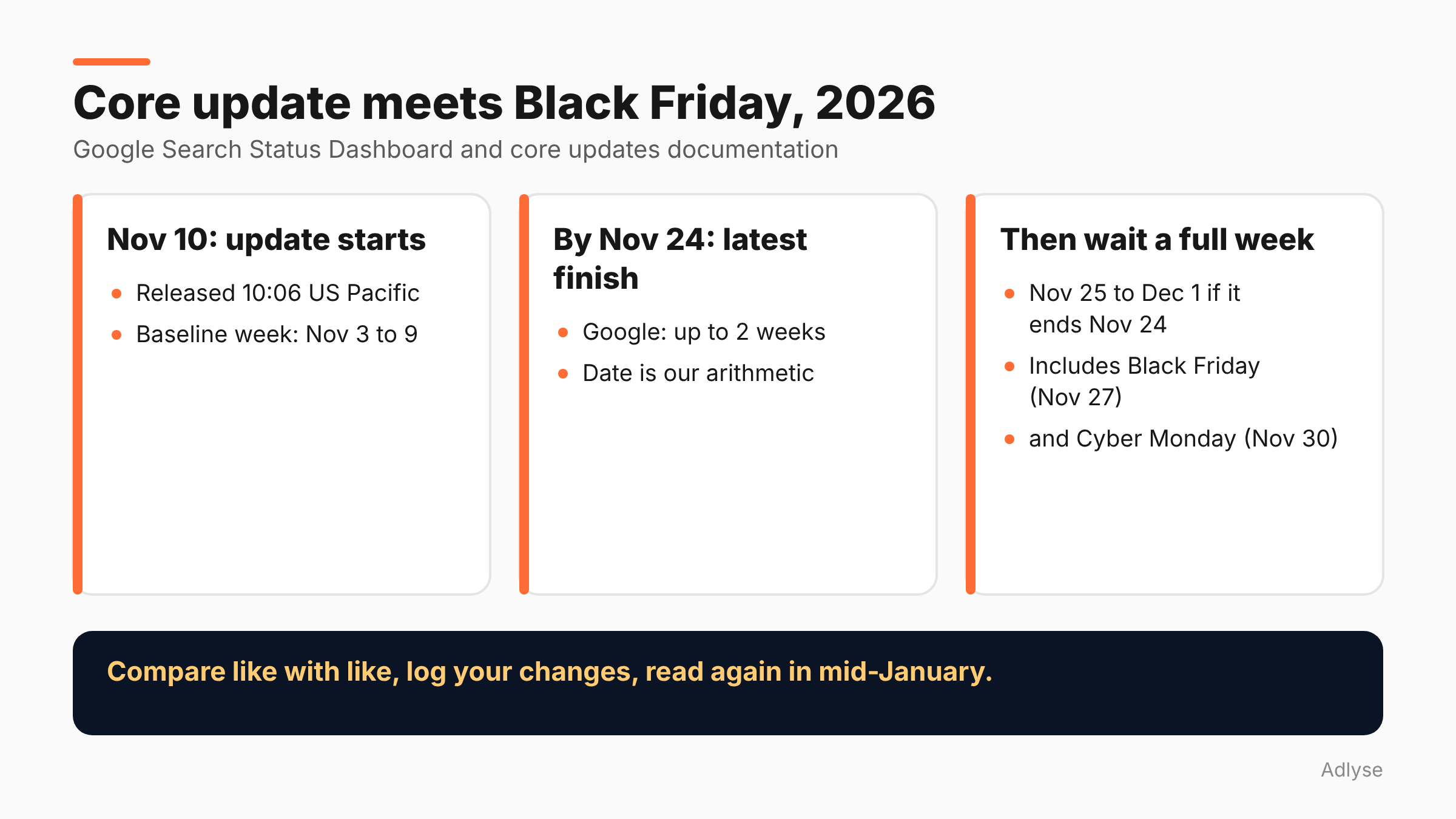
Google's Search Status Dashboard shows the November 2026 core update released on November 10, 2026 at 10:06 US Pacific. It says the rollout "may take up to 2 weeks to complete" and that it applies globally and to all languages.
Two weeks from November 10 is November 24. That is the latest expected finish, which is our arithmetic, not a Google date. The dashboard had not marked it complete when we read it on November 13. Search Engine Roundtable's author expects the rollout to finish around Thanksgiving, and says plainly that this is his estimate.
For scale, PPC Land reports that the May 2026 update ran 11 days and 21 hours, and the March 2026 update ran 12 days and 4 hours. The December 2025 update ran about 18 days. So a finish before Black Friday is likely but not certain.
What does Google say to do?
Google's core updates documentation sets out three steps, which we have paraphrased:
- Confirm the rollout finished. Check the Search Status Dashboard and note the start and end dates.
- Wait. The page recommends "waiting at least a full week after a core update completes before analyzing your site in Search Console." Then compare that week with the week before the update began.
- Judge the size of the drop. A small drop, such as moving from position 2 to 4, calls for no drastic action. Google advises against changing content that already performs well. A large drop, such as position 4 to 29, warrants a deeper review.
For a large, sustained drop, Google tells you to assess the whole site against its helpful, reliable, people-first guidance, look at the most affected pages, avoid "quick fix" changes made only for SEO reasons, and treat deleting content as a last resort.
It also warns that recovery is slow. Per the page, "some changes can take effect in a few days, but it could take several months" for its systems to confirm that a site has improved. No change is guaranteed to produce a noticeable result.
Why does Black Friday break the comparison?
Google's method compares the week after completion with the week before the update. That works when nothing else changes. This year it will not.
- The "before" week is November 3 to 9 if you use the week before November 10. It is a normal pre-peak week.
- The "after" week will probably be November 25 to December 1 if the update ends on November 24. That includes Thanksgiving (November 26), Black Friday (November 27) and Cyber Monday (November 30).
Those two weeks are not alike. Demand, promotions, email sends and paid spend are all different. A Search Console clicks comparison across them will mix the update with the season. We call this the confound.
How do you read it anyway?
This section is our opinion. Google gives the method; the following steps adjust it for peak season.
Compare like with like. Use the same weekdays and the same pages where you can. A product page that sells in a sale week is not comparable to the same page in a quiet week.
Look at rank and impressions by page group, not total clicks. Impressions and average position move less with promotions than clicks do. Group pages by type: category, product, guide, brand.
Use the same period last year with care. Last year's Cyber Monday was December 1, and this year's is November 30, so day-level alignment is off. Align by event day, not by calendar date.
Add annotations. Note the update's start and end dates, your sale dates and any site changes. A chart without annotations will mislead you in January.
Look again after the dust settles. A second read in mid-January, with the calendar effects behind you, is a fairer one.
Separate organic from paid. If your paid campaigns lift branded searches during sale days, your organic branded clicks will rise for reasons unrelated to the update. See our post on reading cross-platform numbers.
What should you not change during the update?
Anything that is not broken. Specifically:
- Do not rewrite top pages in a panic. Google says not to change content that already performs well after a small drop, and says rankings may settle.
- Do not delete content. Google calls it a last resort.
- Do not launch a large site migration or template change in the middle of the rollout. You will not be able to tell what caused a movement.
- Do not take a day-one drop as the answer. The rollout is gradual, and the dashboard says it is not finished.
You should still fix what is broken: a failing checkout, a noindex tag on a sale page, a stock-out. Those are separate from the update. Our Black Friday change freeze checklist covers which changes are safe to make during peak days.
What if traffic drops this week?
First, find out whether the update is the cause. A drop that starts on or after November 10 across many pages may be related. A drop on one page or section may be technical, such as a changed redirect, a blocked resource or a stock-out that removed a product page.
Then check these, in order:
- Is the update still rolling out? If yes, do not act on the data yet.
- Is the drop spread across the site, or isolated? Isolated drops are more often technical.
- Did something change on your side? Releases, plugins, feeds and robots.txt.
- Are your rank trackers reliable? See our post on why rank trackers disagree during a core update.
- What does Search Console show for the affected pages? Use impressions and position by page, not only clicks.
Write what you find in your change log. If it is not documented, in January nobody will remember whether a drop came from the update, a promotion or a deploy.
What should agencies tell clients?
Say it early. "Google started a core update on November 10 that can run up to two weeks. Google says to wait a week after it ends before reading the data. That week will include Black Friday, so we will report it by page group and compare it carefully. We will not change content that is working."
Agree the reporting plan in writing before anyone panics. Clients who are shown the method in advance are less likely to demand changes on a bad Tuesday. For paid media, keep the same discipline: weekly operations with agents works better when a change log exists.
What don't we know yet?
- The end date. Not yet on the dashboard when we checked.
- Which sites are affected. Google calls it "a regular update designed to better surface relevant, satisfying content for searchers from all types of sites," per Search Engine Roundtable's quote.
- Whether unannounced refreshes follow. Search Engine Roundtable notes Google may run periodic refreshes without announcing them.
What should you do next?
Put three dates in your calendar: the day the dashboard shows completion, the date one week later, and mid-January for a second read. If you run changes through Adlyse, each approved change ships with a hypothesis and is graded improved, hurt or neutral. Keep the same habit for site changes during the update, and log them with dates.